longhorn steer
Participating Frequently
Jun 19, 2019 4:51 PM UTC
Answered

automatic update requires system restart, pdfs in use cannot be saved. work lost.

it updates my reader automatically, which is great.

but then i am not able to save pdfs that i'm working with,

so all notes/comments are lost.

there is no warning of the update.

having a warning of, say, a few hours, would preserve work

and be fair to users.

does anyone have advice-workarounds-agreement-disagreement ?

i appreciate what adobe does to enable folks to read online links,

especially regarding congressional correspondence, but in "the heat

of battle" saving first sometimes doesn't happen, while notes and

cross-references get added - then lost - upon auto update.

appreciate assistance/acknowledgement.

This topic is closed to new replies. Start a new post to keep the conversation going.
AkanchhaS8194121
AkanchhaS8194121Correct answer
Legend
Jul 19, 2019 3:37 PM UTC

Hi there!

We regret for the inconvenience caused.

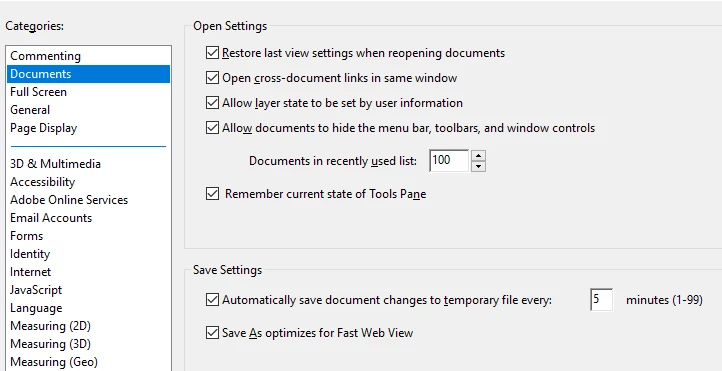
Adobe Reader DC does have auto-save feature, how exactly it works and applies for that you may read this article: Saving PDFs in Adobe Acrobat and Reader

As per Adobe Reader's preferences setting, it automatically save document changes to temporary file....

You can navigate to Reader>Edit>Documents

You can look for the backup files in your systems's temp folder: "%USERPROFILE%\AppData\Local\Temp its quite difficult to find the exact file there, but its worth giving a try.

Else, there isn't anything else that we can do about it.

You can also use this form to request new features or suggest modifications to existing features- Feature Request/Bug Report Form

Hope this helps!

Thanks,

Akanchha

4 replies

Participating Frequently
Jul 19, 2019 4:38 PM UTC

What is your operating system and Reader version?

On Windows, auto update does not start if application is in use.

Translate
longhorn steer
Participating Frequently
Jul 20, 2019 9:47 AM UTC

thank you, leo.

i received your suggestion, and info from another staff member.

i think i'm all set now going forward.

regards

Translate
AkanchhaS8194121
AkanchhaS8194121Correct answer
Legend
Jul 19, 2019 3:37 PM UTC

Hi there!

We regret for the inconvenience caused.

Adobe Reader DC does have auto-save feature, how exactly it works and applies for that you may read this article: Saving PDFs in Adobe Acrobat and Reader

As per Adobe Reader's preferences setting, it automatically save document changes to temporary file....

You can navigate to Reader>Edit>Documents

You can look for the backup files in your systems's temp folder: "%USERPROFILE%\AppData\Local\Temp its quite difficult to find the exact file there, but its worth giving a try.

Else, there isn't anything else that we can do about it.

You can also use this form to request new features or suggest modifications to existing features- Feature Request/Bug Report Form

Hope this helps!

Thanks,

Akanchha

Translate
longhorn steer
Participating Frequently
Jul 20, 2019 9:45 AM UTC

thank you. i've read the "saving" post you linked for me.
i also went to the temp folder.
later i will look at some of those files in re comments, but most if not all have been redone.
had (still having) some trouble with your reply link to "read conversation" - problem connecting?
but i will check my current document-saving setting to be sure.
yay for having staff answer lowly pleb. appreciate you taking time to answer so well.

regards.

Translate