Participant
July 21, 2018
Question

Barcode font error CODE128ABTALL - AR unable to display font

  • July 21, 2018
  • 1 reply
  • 1158 views

I have attached the error screen shot I am getting on adobe reader even the fonts are already installed on windows, the same fine if it is in word it can read properly however if it is in PDF it just shows the dots in stead of barcode as shown below;
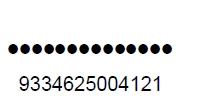
please help to get this issue fixed.

Thank you.

    1 reply

    AnandSri
    Legend
    July 23, 2018

    Hello Johanh,

    We're sorry for the trouble you had with the PDF file, please navigate to Adobe Reader's Preferences from Edit>Preferences>Page Display>Under Rendering>Select 'User Local Fonts'>Click OK.

    Close Adobe Reader, check for any pending updates from help>check for updates, reboot the machine after updating Adobe Reader.

    Launch Adobe Reader and the PDF and see if this brings any difference. Are you getting the error message with one specific PDF or with all the PDF files?

    When the fonts are not embedded in the PDF, you get the error message. How was this PDF originally created? Navigate to PDF's properties from File>Properties>Description>Check the PDF Producer.

    Also, share a screenshot of the Fonts tab in Document's Properties Window, File>Properties>Fonts. To share the screenshot, refer to https://forums.adobe.com/docs/DOC-7043#jive_content_id_How_do_I_attach_a_screenshot

    If it is specific to one PDF, Is it possible to share the PDF file with us so that we can test it at our end? To share the file, please use Adobe Send feature, login to https://cloud.acrobat.com/send using your Adobe ID(email) and password, upload the file, share the link to files via private message only, How Do I Send Private Message

    Let us know how it goes and share your observation.

    Thanks,

    Anand Sri.