
Participant
March 10, 2019
Question

Black ribbon/area on thumbnail previews: WHY?

  • March 10, 2019
  • 1 reply
  • 683 views

Hello Guys, hope someone mind give me a hand here.

This is not a problem at all, just a small thing that gets to my nerves now and then, LOL.

The thing is that SOMETIMES I get a black area inside the thumbnail preview, exactly like this:
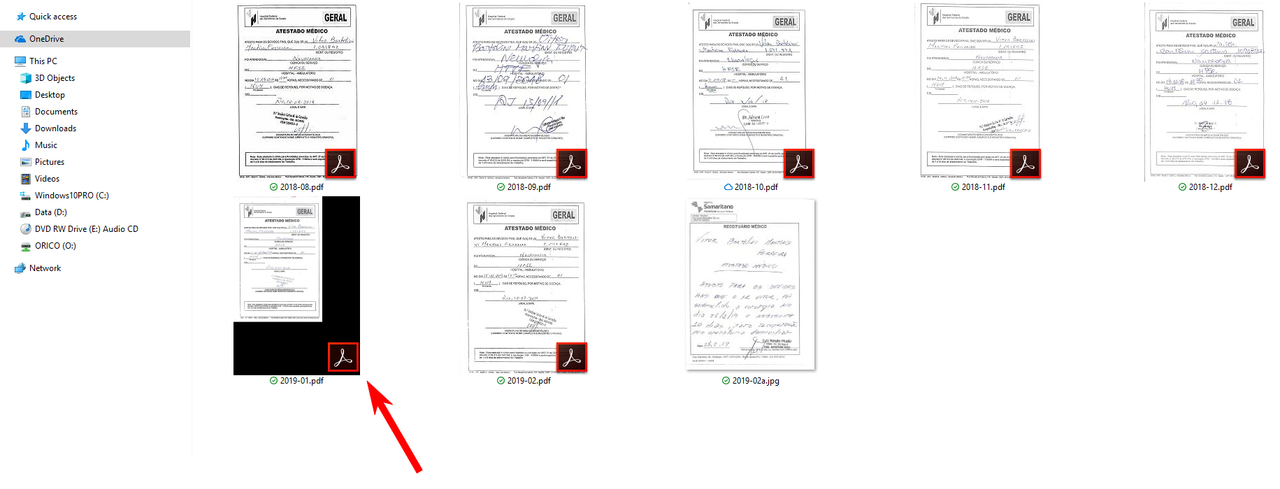
screenshot-49.png

These documents were all scanned on the same scanner using exactly the same settings, so exactly what is causing this behavior on the thumbnail preview? Any ideas? I've got Windows 10 1809 and Adobe Acrobat DC 2015 going.

One thing to note is that this "black area" is not present when the PDF is opened, it only shows on the thumbnail 😕😕

Thanks

VBrt

    This topic is closed to new replies. Start a new post to keep the conversation going.

    1 reply

    AnandSri
    Legend
    March 11, 2019

    Hello Vbrt,

    We're sorry for the trouble you had, what is the version of Acrobat DC 2015 installed? To identify, please refer to the help article Identify the product and its version for Acrobat and Reader DC and share the version details available as 2015.009.xxxxx

    Make sure you have the latest version of Acrobat Pro DC 2015 installed, check for any pending updates from help>check for updates. Reboot the machine after updating Acrobat as few similar issues were fixed after installing the latest update.

    Check for any pending updates of Windows as well from Control panel and install any pending Mandatory or optional updates, reboot the machine and check.

    You may also refer and try the suggestion from the following Adobe discussions sharing the fix for a similar issue related to pdf icons

    A quick and easy fix for pdf thumbnail problem with Acrobat and Reader X

    pdf icons on desktop turn into black squares

    Let us know how it goes and share your observation.

    Thanks,

    Anand Sri.