December 10, 2025
Answered

Blocked by white blank pop up that can't be close

  • December 10, 2025
  • 1 reply
  • 623 views

Hello,

I wish to use my license for Adobe Reader pro but because of this white pop up, i can't. I've downloaded the last version of the software "Continuous Release | Version 2025.001.20997 | 64 bits Licenses : Acrobat Pro" on Windows 11 last update.

This appears right after to edit a pdf or if i wait ~5 seconds at the opened software, and then when it's appears i can't close this blank square. I have to close Adobe by the task manager.


I've already tried so many options to resolve this :

- Install the last version

- Fully delete Adobe (certificates, Adobe Creative Cloud, folders %Appdata%, folders basically everywhere about Adobe)

- Tried AcroCleaner

- Tried on another PC and got the same result

- Verified my license to be sure that i can pay this my card


Thanks
 

Correct answer j�r�me_2417

Hi again,


Thanks @S. S but i did not follow your instructions because I've found the solution by myself.


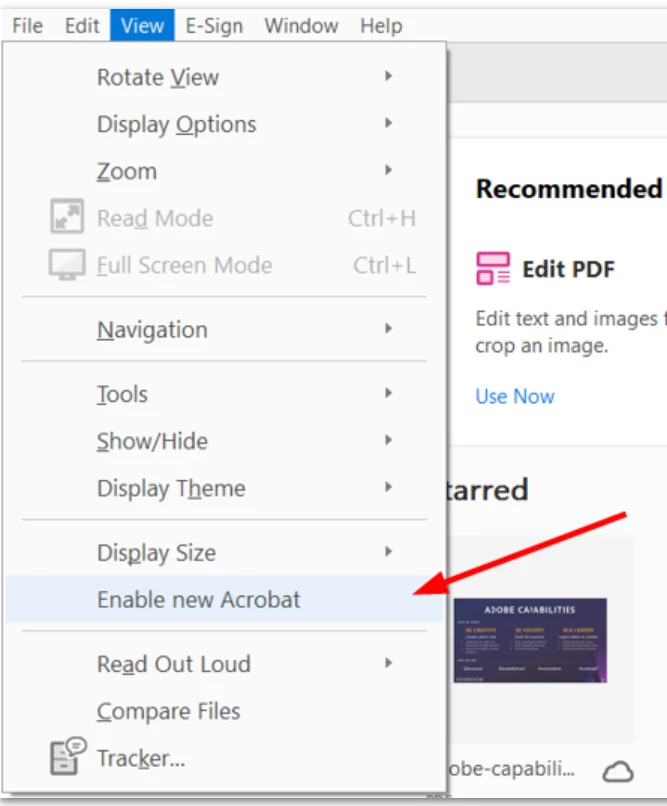
- So, you just have to go back on the old Adobe viewer :

- Then the white window shows up and displays what it should display (here: the software update for the pro version). I did not mention it, but the button “Modify the documents" was followed by a blue crown and i wasn't aware it was for the pro version.

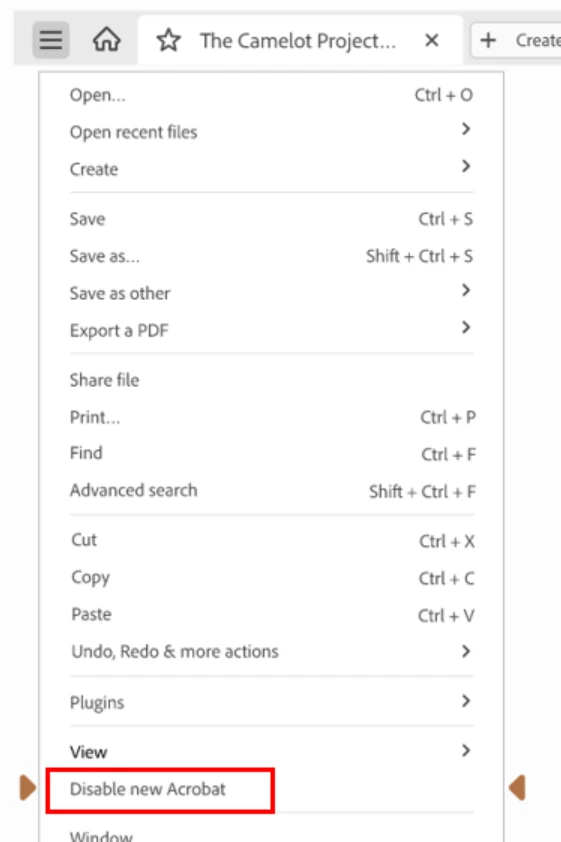
- After the update, you can go back on the “new Adobe viewer” :


Reference to the information can be found here: https://www.adobe.com/devnet-docs/acrobatetk/tools/PrefRef/Windows/FTEDialog.html


I think, all the subjects with this white blank pop-up can be resolved this way (Adobe give me a job...).


Regards,
Chad MARTIN

TIXIA corp.


1 reply

Souvik Sadhu
Community Manager
Community Manager
December 11, 2025

Hi @j�r�me_2417,


Hope you are doing well. Sorry for the trouble with using Acrobat.


Would you mind trying out the steps below:

Go to Start > Registry Editor > Location "HKEY_LOCAL_MACHINE\SOFTWARE\Policies\Adobe\Acrobat Reader\DC\FeatureLockDown"

Create a DWord: bToggleFTE

Value: 1


Reference to the information can be found here: https://adobe.ly/3Mot1Xf


If this does not help, please assist us in gathering logs from your machine: https://adobe.ly/4l1gBRA. Please make sure Procmon is selected. You can upload logs using this tool and share your Unique log ID with us. 


Look forward to hearing from you.


Regards,
Souvik.

j�r�me_2417AuthorCorrect answer
December 15, 2025

Hi again,


Thanks @S. S but i did not follow your instructions because I've found the solution by myself.


- So, you just have to go back on the old Adobe viewer :

- Then the white window shows up and displays what it should display (here: the software update for the pro version). I did not mention it, but the button “Modify the documents" was followed by a blue crown and i wasn't aware it was for the pro version.

- After the update, you can go back on the “new Adobe viewer” :


Reference to the information can be found here: https://www.adobe.com/devnet-docs/acrobatetk/tools/PrefRef/Windows/FTEDialog.html


I think, all the subjects with this white blank pop-up can be resolved this way (Adobe give me a job...).


Regards,
Chad MARTIN

TIXIA corp.