
Blue background in preview and Acrobat (view) document (bug)
Configuration:
Adobe Acrobat is the default (only) PDF viewer.
System: Windows 7; current updates (Including: Edge)
V: 21.11.20039.0 [?]
Bug:
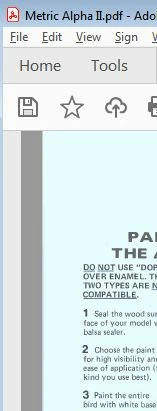
When explorer highlights a pdf document (and the preview of the doc is displayed) and/or when a document is opened: Adobe Acrobat changes the white (background color) to blue (pale).
It is unclear when this single color change (white as background to blue) – action started or what instigated it; to my knowledge I’ve not enabled any such feature on a system / program level. There is no highlights, no checkboxes and this occurs with every PDF both ‘old’ and ‘new’ (new created).
This ‘blue’ hue makes reading (viewing) documents with shading difficult. Worse; if there is blue on blue – it is all but impossible to view.
Where did this come from; and more important: how to get rid of it? I treat this as a ‘bug’ as it is a undesired ‘feature’ with unexpected results; specifically: Why should a white document appear blue if I've not made a (system) change; and why shoud the preview of the document be blue?
This 'change' (blue highlight) now occures with all PDF documents; in both preview (explorer) and document view (Acorbat).
Attached are two screen shots; one preview (Windows explorer) and one in Accrobat.



 AdChoices