
Legend
June 13, 2017
Question

Blue Box Outline appears when using Find Functionality

  • June 13, 2017
  • 4 replies
  • 6249 views

Many a time when we search for a word in a PDF, Acrobat/Reader highlights the word, but the selection size is extremely small in size which makes it difficult to find where the highlight was done. For such cases, Acrobat/Reader has a feature known as “Halo affect”. If the text selection size is below a threshold, a blue rectangle is drawn with the selection in the centre. This makes it easy for the user to find the highlighted text. See snapshot below showing how the halo rectangle looks like.
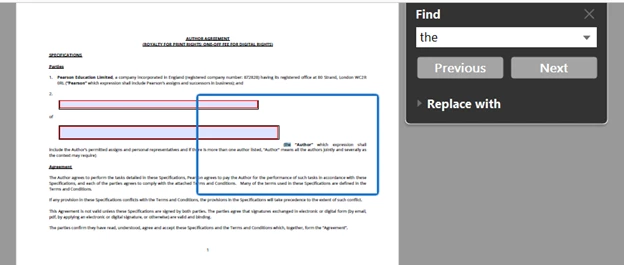
The halo rectangle works as a zoom-in function. Clicking inside the rectangle will zoom-in with the selected text in the center. Also, if the PDF is "zoomed in" so that the text selection size increases beyond the threshold, the halo rectangle automatically disappears.

This topic has been closed for replies.

4 replies

Participant
July 28, 2023

This blue box (Find) is VERY annoying - how to remove? 

Participant
February 15, 2022

Please let us turn this off. As helpful as it is to zoom in like this, if I need to select text that is outside the zoomed-in area, it is a pain!

Participant
April 14, 2022

I have the same problem, I can't search correctly anymore. It started doing this for no reason one day without changing anything in my settings..

fishjd
Participant
April 29, 2021

Add a setting to turn this on or off as desired.  I would like to turn it on at all times.  So of the other replies would like to turn it off. 

Participating Frequently
May 10, 2019

How do I turn this off? I am getting a strikethrough of the searched term and the annoying blue box. I want the word highlighted and no box.

Participant
October 24, 2019

I haven't found a way to turn it off completely but it sounds like the box is programmed to show up when the font size drops below a certain threshold.  If I increase the magnification of the page, the box disappears.