


Participant
February 10, 2021
Answered

Bug version 21.001.20135

  • February 10, 2021
  • 11 replies
  • 5687 views

Windows Server 2016.

Own application in WPF with WebBrowser (using Internet Explorer).

View a PDF into the WebBrowser causes an error message (sorry in french).
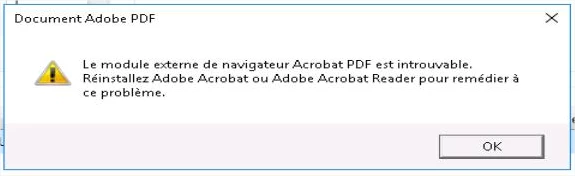
"PDF Browser Plugin is Missing"

With previous version no problem.

 

This topic has been closed for replies.
Correct answer Meenakshi_Negi

Hi All,


Thank you for your patience.


We have released an update for Acrobat and Reader DC(version 21.001.20138) that contains the fix. 

Please update the application to the latest version. In the application, go to Help > Check for updates.


For more information about the latest version, please refer to this link: https://www.adobe.com/devnet-docs/acrobatetk/tools/ReleaseNotesDC/continuous/dccontinuousfeb2021qfe.html#dccontinuousfebtwentytwentyoneqfe 


Let us know how it goes.


Thanks,

Meenakshi

11 replies

CharlieC25
Participant
February 10, 2021

I've been getting the error "An error has been detected with a required application library and the product cannot continue. Please reinstall the application."

Re-installed a lower version and its working fine now. this update needs a fix!

Adobe Employee
February 11, 2021

Hi @CharlieC25 / @defaultgvyr4vhafhlf , requesting you to please share the snapshot of Preferences > Internet to help us debug this issue further.


Regards,
Sandeep