


Participant
November 24, 2021
Question

Can't open a pdf file
  • November 24, 2021
  • 1 reply
  • 264 views

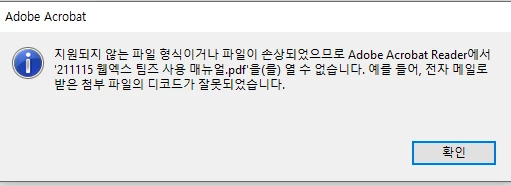
 I can't open a pdf file. It's a protected file and I'm trying to open this in the company. everyone except me can open it. it says it's not supported form of file or the file has been damaged. 

Is there a way to open this file? 


This topic has been closed for replies.

1 reply

Ria Tagra
Inspiring
November 24, 2021

Hi @Missy5E86 ,


Hope you are doing well.

As you have mentioned that you are unable to open a PDF. We need to know few more details to understand the issue better.

  1. Is there any error message showing up?
  2. Have you tried with some other PDF viewer, are they opening fine?
  3. What is the OS version?

Make sure that you have the latest version of Adobe Reader version installed, check for the updates from help menu of Adobe Reader>check for updates. Reboot the machine after updating Adobe Reader.


Please check if compatibility settings are applied under Reader shortcut:

  • 1- Find Reader shortcut on the desktop>right-click>Properties
  • 2- Check if the box next to "Run this program in compatibility mode for" is checked.
  • 3- If it is, uncheck the box>click Apply>OK, try opening pdf and see if that works.


You may also refer and try the suggestion from the following Adobe discussion incompatability


If possible, disable any security software you had and check.


Please update your application to the latest version, then sign out and sign back in.

https://www.adobe.com/devnet-docs/acrobat/android/en/troubleshooting.html#determine-your-app-version


Kindly provide us the above details so that we can assist you with specific resolution steps.


Thanks,

Ria