


Participant
September 30, 2021
Question

Can't open PDF documents

  • September 30, 2021
  • 1 reply
  • 518 views

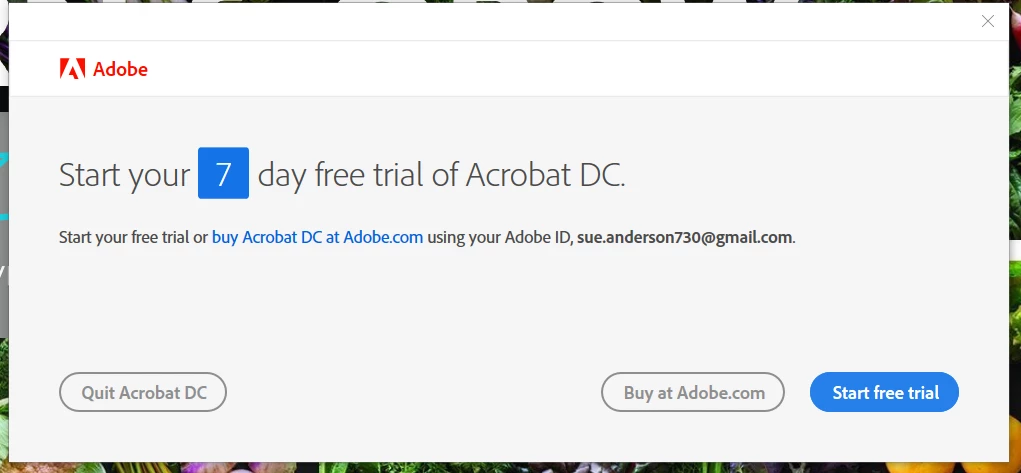
I've been using Adobe Reader on my laptop for years without any issues. All of a sudden, I can no longer access PDF documents. When I click on a document, it opens, but the message below immediately pops up. When I close the window, my PDF document also closes. I've reinstalled the Adobe Reader program, but still no luck. Any suggestions?
 

This topic has been closed for replies.

1 reply

Harsh Vardhan Pareek
Participating Frequently
October 1, 2021

Hi @Susan5ED4 


Hope you are doing well.

As shown in the image that it is a prompt to start a 7 day free trial for Acrobat Pro DC. To get rid of this box you need to check in the start menu, there might be two applications installed, one is Adobe Acrobat Reader DC and one is Adobe Acrobat DC. 

You need to uninstall the Acrobat DC application and make Acrobat Reader DC as the default PDF viewer.

Steps to make Acrobat Reader DC as default PDF viewer are provided in the help document below:

https://helpx.adobe.com/acrobat/kb/not-default-pdf-owner-windows10.html


Let us know if that works.


Thanks

Harsh

Susan5ED4Author
Participant
October 7, 2021

Thanks for your response. Yes, I had already figured out that I needed to delete the program and reinstall it. I'm all set now. Thank you.