
alexanderh24709753
Participant
December 9, 2016
Question

Can't open PDF with Adobe Acrobat Reader DC with a webapplication

  • December 9, 2016
  • 2 replies
  • 1102 views

Hi,

i am trying to open a pdf file from my webapplication (asp.net) and i get following message after a while.

The pdf doesn't open. After that i can't open Adobe Acrobat Reader DC directly. Or i can' open any pdf directly with the Reader.

And in the Taskmanager you will see it opens many processes of Adobe
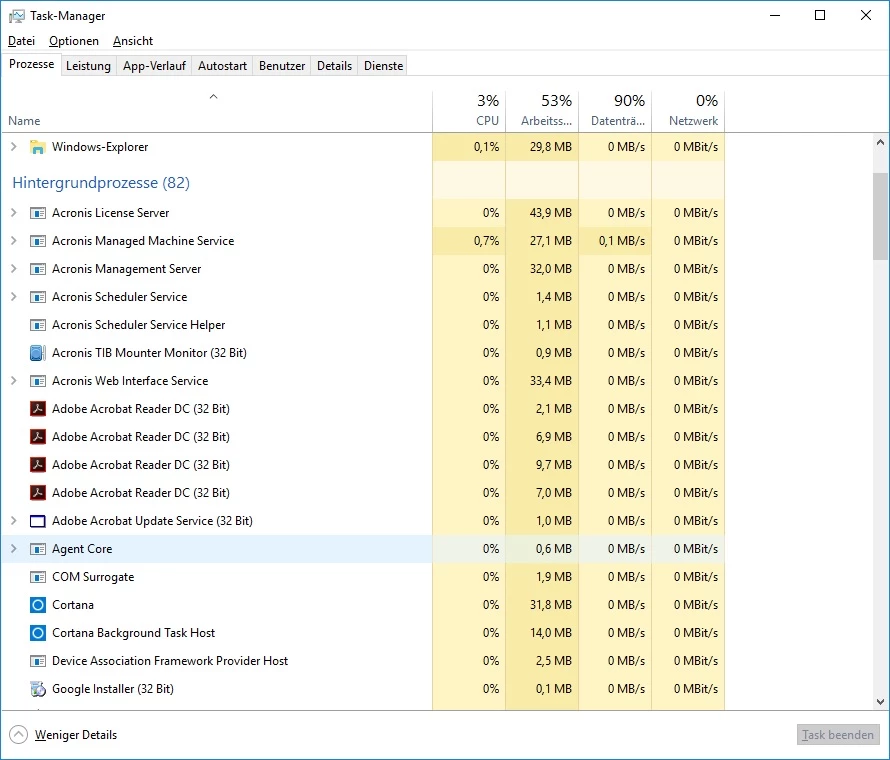
is there an other (better) way as the below code to open a pdf file?

public class Download : IHttpHandler, System.Web.SessionState.IRequiresSessionState
  
{

  
public void ProcessRequest(HttpContext context)
  
{
  
try
  
{
  
string filename = "DEV-H211.pdf";
  
string documentDirectory = @"D:\";

  if (File.Exists(string.Format("
{0}\\{1}", documentDirectory, filename)))
  {
  context.Response.ContentType = "
application/pdf";
  context.Response.AddHeader("
content-disposition", string.Format("attachment; filename={0}", filename));

  context.Response.TransmitFile(string.Format("
{0}\\{1}", documentDirectory, filename));
  context.Response.Flush();
  }
  }
  catch(Exception ex)
  {
  Console.WriteLine(ex.Message);
  } 
  }

  public bool IsReusable
  {
  get
  {
  return false;
  }
  }
  }

    This topic is closed to new replies. Start a new post to keep the conversation going.

    2 replies

    AadeshSingh
    Participating Frequently
    December 10, 2016

    Hi alexanderh24709753

    Try the solutions given below:-

    Solution 1) (This error occurs when you have more than 1 process of Acrobat running)

    • 1) Go to the task manager by pressing Ctrl+Alt+Del
    • 2) Go to the processes in Task Manager
    • 3) End all processes related to Acrobat
    • 4) Launch Acrobat again.

    Solution 2) Open Acrobat navigate to Help menu & Repair the installation.

    Solution 3) Check the file association on your system.

    Solution 4) Navigating to HKEY_CLASSES_ROOT\acrobat\shell\open\ddeexec\application and changing the Key "AcroviewA10"  to  "AcroviewR10.

    Regards,

    Aadesh

    alexanderh24709753
    Participant
    December 13, 2016

    I found the problem. If i start the webapplication with Visual Studio as an Administrator and the Browser opens with the application, it has a problem. If the Browser is open and then i start the application, there is no problem.

    It must be something with Visual Studio and starting as Administrator