Participant
November 26, 2020
Answered

Can´t print PDF

  • November 26, 2020
  • 2 replies
  • 3248 views

I use on my website GravityForms with the addons fillablePDF to generate a PDF for my customers. The PDF has the permission for printing but when i or my customer try to print the pdf, it thows an error. When I use another programm or my webbrowser to open the pdf i can print without problems. in the attachment is an example pdf i cant print.

This topic has been closed for replies.
Correct answer Dov Isaacs

I've downloaded the PDF file in question and examined it with Acrobat Pro DC's Preflight function.


The problem is that this is absolutely not a valid PDF file. Per the diagnostics shown below, there are numerous errors in the structure and contents of this PDF file:
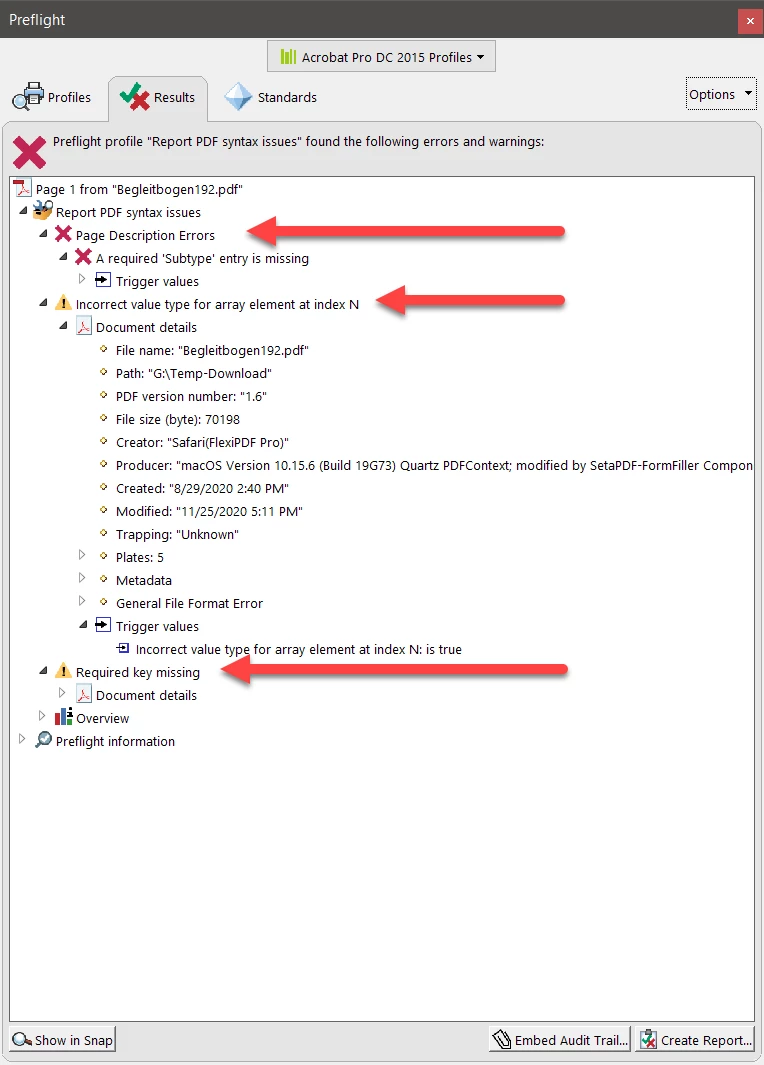


Why does this PDF file print in other PDF readers? Simple! These other readers often ignore serious problems in PDF files resulting in either incorrect output, crashes, and/or security compromises to your (and perhaps your customers') systems.


Furthermore, you should be aware that beyond the errors denoted above, the PDF file does not have its fonts embedded. This could lead to improper display and print as well.


Unfortunately, at Adobe we cannot “fix” the creation of this PDF file for you since it was generated by third party software that is obviously somewhat flawed in its implementation.
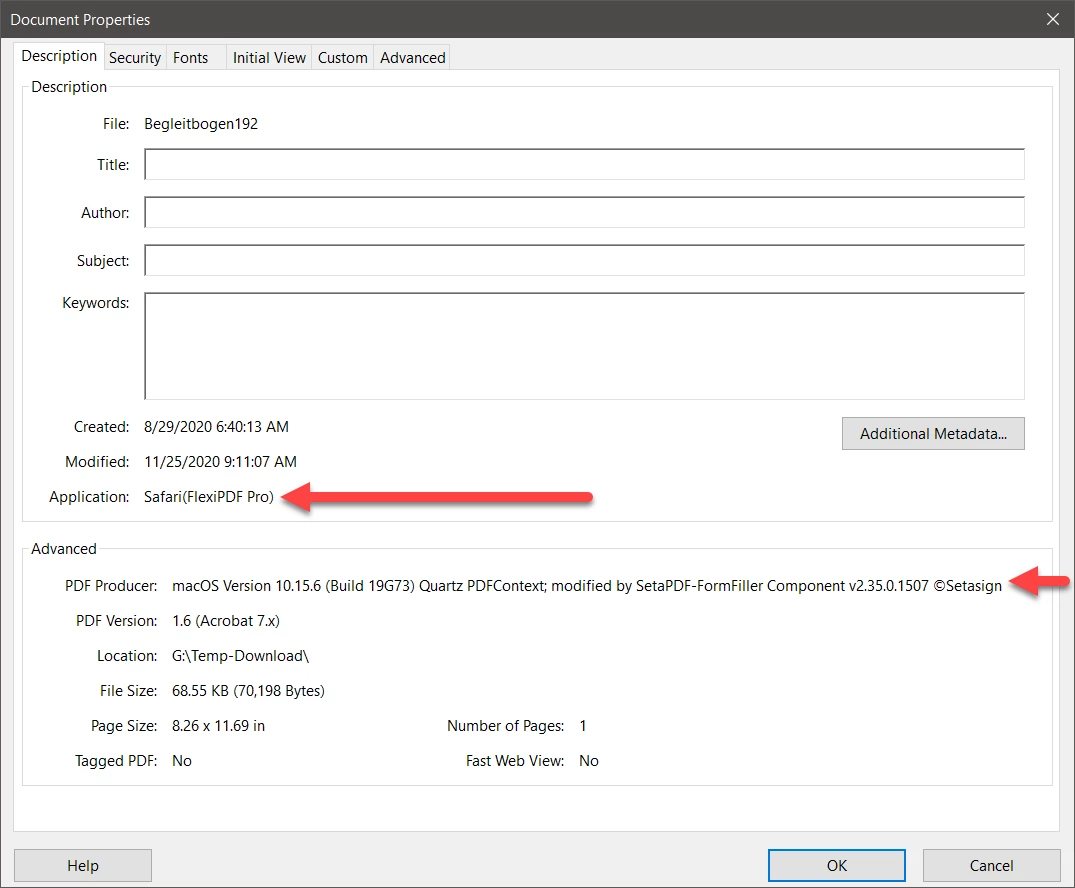


If you expect your customers to be able to actually use the forms you are creating, we would strongly recommend that you contact the company whose software creates these PDF files and require fixes from them to create valid PDF files.




2 replies

Dov Isaacs
Dov IsaacsCorrect answer
Legend
December 6, 2020

I've downloaded the PDF file in question and examined it with Acrobat Pro DC's Preflight function.


The problem is that this is absolutely not a valid PDF file. Per the diagnostics shown below, there are numerous errors in the structure and contents of this PDF file:


Why does this PDF file print in other PDF readers? Simple! These other readers often ignore serious problems in PDF files resulting in either incorrect output, crashes, and/or security compromises to your (and perhaps your customers') systems.


Furthermore, you should be aware that beyond the errors denoted above, the PDF file does not have its fonts embedded. This could lead to improper display and print as well.


Unfortunately, at Adobe we cannot “fix” the creation of this PDF file for you since it was generated by third party software that is obviously somewhat flawed in its implementation.


If you expect your customers to be able to actually use the forms you are creating, we would strongly recommend that you contact the company whose software creates these PDF files and require fixes from them to create valid PDF files.



- Dov Isaacs, former Adobe Principal Scientist (April 30, 1990 - May 30, 2021)
Amal.
Community Manager
Community Manager
November 26, 2020

Hi Florian,


Hope you are doing well and sorry for the trouble. As described you are unable to print the PDF file and getting the error message. However , they are printing fine via web browser.


Web browsers use their own technology to render and display the PDF and they are not Adobe dependent.


Would you mind sharing the screenshot of the error message for a better understanding?


I have checked the PDF file you have attached and found that it was built using a non Adobe application (Apple's Quartz PDF context) Please try to create the PDF using Adobe Acrobat DC and see if that makes any difference.


What is the make and model of the printer you are using ? Please try to check for any missing updates for printer driver and firmware and try updating it and reboot the printer once and check.


Try to Remove all documents in the printer queue. To see if there are multiple documents stuck in the printer queue and delete them:

1. Close Acrobat.

2. Choose Start > Settings > Printers And Faxes.

3. Double-click the printer you are attempting to print to.

4. If there are documents in the queue, choose File > Cancel All Documents. It maybe necessary to restart your computer after choosing this option.

5. Start Acrobat and print.


You may also try to print the pdf as image and check:

1. Open the PDF file in Acrobat.

2. Choose File > Print.

3. Click Advanced at the bottom of the Print dialog box.

4. In the resulting Advanced Print Setup dialog box, select Print As Image and click OK.


For more information please check the steps provided in the help page https://www.adobe.com/support/techdocs/333236.html

Note: Steps are same for new version


Hope this information will help


Regards

Amal

Participant
November 26, 2020

The printer doesn´t matter. i can take every printer in the list with the same result. Now i have "microsoft print to pdf". I have dowloaded two other pdf reader programms and with both i can print the pdf. The option "print as image" also didn´t work. 

Amal.
Community Manager
Community Manager
November 27, 2020

Hi there


the option 'Print to PDF' is a Microsoft process of creating the PDF file. Please try to create the PDF using the Adobe Acrobat Ribbon in the MS Word Toolbar and see if that helps. For more information about creating PDF from MS Office please check the link: https://helpx.adobe.com/in/acrobat/how-to/create-pdf-files-word-excel-website.html


Also please check the printer troubleshooting steps in the help page: https://helpx.adobe.com/in/acrobat/kb/troubleshoot-pdf-printing-acrobat-reader.html


Regards

Amal
