
Participant
November 3, 2025
Question

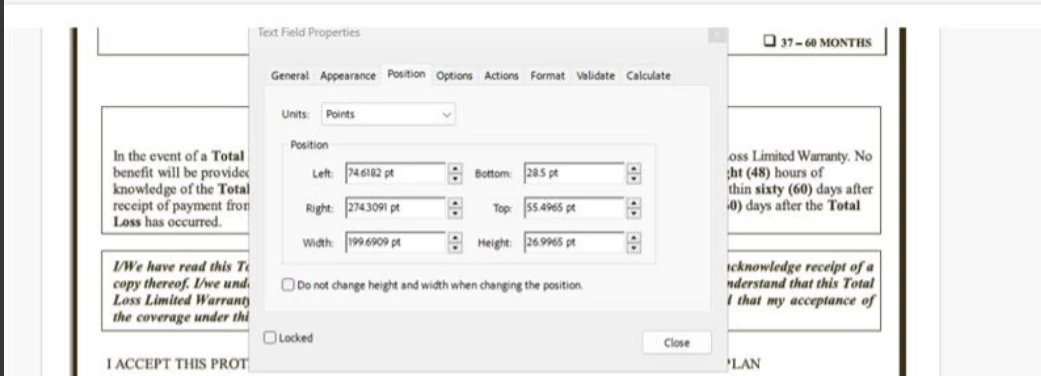
Can't set left and bottom of text field to 0 pt

  • November 3, 2025
  • 1 reply
  • 80 views

I have one PDF, But the limitation of left and bottom is 28.5 pt.
For another file file, I'm able set to 0 pt. 
Do you know what configuaration lead to this result?
I've check header, footer, boxes, but found nothing
 

1 reply

Amal.
Community Manager
Community Manager
November 3, 2025

Hi there


Hope you are doing well and sorry for the trouble. 


It sounds like the 28.5 pt margin you’re seeing might be coming from the page setup or printer settings embedded in that specific PDF. Some PDFs are created with a defined page margin or crop box that prevents reducing margins below a certain point.

Here are a few things you can check:

  • Open the PDF in Acrobat Pro > Print Production > Set Page Boxes  (https://adobe.ly/490q20f)– compare the CropBox and TrimBox values with the file where you can set 0 pt.
  • If the file was created from another application (like Word or InDesign), check if it was exported with predefined printer margins.
  • Try “Save As > Optimized PDF” and remove any preset printer marks or settings.

If those values differ between the two PDFs, that’s likely what’s enforcing the 28.5 pt limitation.


Hope this information will help.


~Amal


duc_7562Author
Participant
November 4, 2025

@Amal. I did not see any different

Amal.
Community Manager
Community Manager
November 4, 2025

Hi there 


We are sorry to hear that. Is this an issue with a particular PDF file or with all the PDFs? If its a file specific issue please share the affected PDF so we can check it at our end. Also a small video recording of the steps you are taking and the issue as it occurs would be very helpful.


~Amal