Participant
May 8, 2018
Answered

Can't sign documents with digital IDs

  • May 8, 2018
  • 2 replies
  • 24888 views

I followed all the steps described by adobe to add a digital ID, but at the final step I suddenly get prompted

"You do not have any digital IDs suitable for signing this document."

The only option I then have is to click "Add Digital ID" or "Cancel".

Any suggestions what's going wrong??

This topic has been closed for replies.
Correct answer Meenakshi Negi

I'm not really an expert on creating signature fields so I don't seem to be able to add it for some reason :-)

I have a document which needs to be signed with a digital ID.

I'm using Adobe Acrobat Readed DC version 2015.006.30417 installed on a Windows 7 PC.

Thanks for the help so far!


Hi Joerit,

When you open the document, go to Tools > Certificates and click on Digitally Sign.

The click and drag to create the Digital Sign field.

Once done, "Sign with Digital ID" will appear.
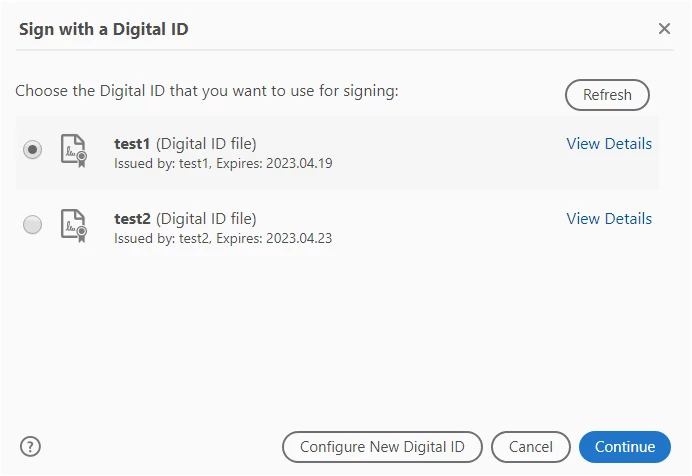
Click on "Configure New Digital ID" tab at the bottom.

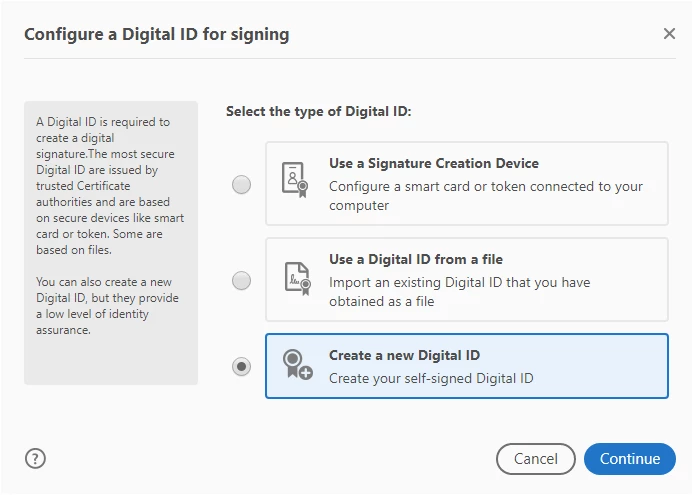
Then select the radio button for "Create a Digital ID" and click on continue.
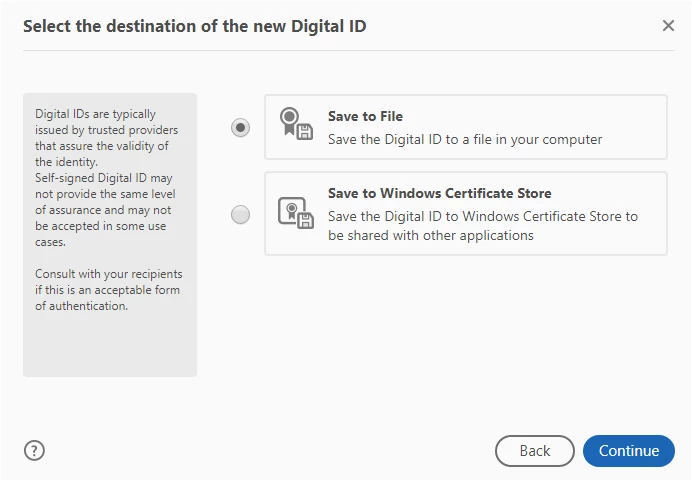
Then select the radio button for "Save to File" and click on continue.
Now enter the details in the fields and click on continue.

Then browse the location where you wish to save the Digital ID and create a password.

Confirm the password and click on Save tab at the bottom.

Now, you will get a list of digital ID. Select the one you have just created and click on continue.

Then enter the password in the box at the bottom left of the window.

Make sure you enter the password correctly and then click on Sign tab at bottom right.

Hope this will work.

Let us know how it goes.

We will be waiting for your reply.

Regards,

Meenakshi

2 replies

Participant
December 7, 2021

I have no clue how to sing in,  use 2 step method .I CANNOTunderstand instructions 


Meenakshi Negi
Community Manager
Community Manager
May 8, 2018

Hi Joerit,

As you have mentioned above you experience an issue in adding a Digital ID.

Please refer the steps mentioned here Digital IDs in Acrobat to register a digital ID with the application.

If you do not have any digital ID, then you can create your won signed digital ID.

You may refer the same link as mentioned above to create the digital ID.

If you still experience an issue, please share the exact steps you do that results in the error message.

We will be waiting for your response.

Let us know if you have any question.

Regards,

Meenakshi

Participant
May 8, 2018

Hello,

I have followed all the steps mentioned, but from the moment I click "finish" (after choosing a password) there's a messagebox saying:

"You do not have any digital IDs suitable for signing this document."

If I then open the ID settings via "preferences" I see there is an ID created.

I can then select it to sign documents via "usage options" but I still can't sign the document.

Every time I try to sign a document I get prompted to create an ID or select an existing ID.

If I select to use an existing ID from a file (the one which was created), I have to login and afterwards it again reports

"You do not have any digital IDs suitable for signing this document."

Meenakshi Negi
Community Manager
Community Manager
May 8, 2018

Can you open any alternate PDF and try to add the digital signature there?

Check if you get the same error message.

Please try once to create a new digital ID in the application.

Click on the digital signature field and click on "Configure new digital ID" at the bottom of the window that appears.

Then select the radio button for "Create new digital ID"

Once the digital ID created, try to add the signature to PDF.

Check if you new ID works.

Could you please let us know the version of the Adobe application installed on your machine?

Use the steps mentioned here Identify the product and its version for Acrobat and Reader DC to check the version number.

What is the OS version installed on the machine?

Regards,

Meenakshi
