
Participant
May 1, 2019
Answered

Can't use Adobe reader which is installed

  • May 1, 2019
  • 2 replies
  • 673 views

A few days ago I suddenly became  unable to view pdfs.
I can view them if I set the default app to microsoft edge, but this does not allow me to create pds from illustrator.

I have uninstalled and reinstalled adobe reader DC twice and set it to default app adn I keep getting error messages when trying to create new pdf out of illustrator and when trying to view old pdfs already saved in my files. It will not open pdfs received by email

When I try to lauch reader from the start menu I get this:
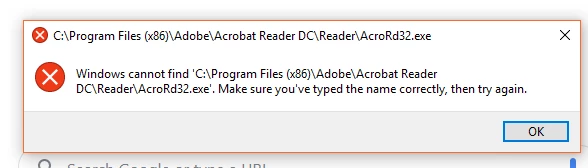
Can anyone tell me what on earth is going on please? I can't do my work and I get paid near minimum wage by the hour!!!

Thank you

    This topic has been closed for replies.
    Correct answer AnandSri

    Hey Rachaelc,

    I am sorry for the trouble and for the delayed response. Could you please check for any pending updates of Windows OS from Control Panel and install all the Mandatory and optional updates, reboot the machine after installing the updates.

    Then use Acrobat cleaner tool to remove the installed Adobe Reader application Download Adobe Reader and Acrobat Cleaner Tool - Adobe Labs

    Disable any security software installed for a temproraly basis, reboot the machine again and install Adobe Reader DC from Adobe - Adobe Acrobat Reader DC Distribution

    You may also try the following steps:

    • Close Adobe Reader and other Adobe application.
    • Open Task Manager and close all the Adobe-related process.
    • Hold down Windows key and press R on your keyboard, this will bring up the Run dialogue box.
    • Type regedit in the run dialogue box and hit Enter, click Yes when User Account Control pop-up appears.
    • Navigate to HKEY_LOCAL_MACHINE\SOFTWARE\Microsoft\Windows NT\CurrentVersion\Image File Execution Options, delete the key AcroRd32.exe
    • Relaunch Reader

    Let us know how it goes and share your observation.

    Thanks,

    Anand Sri.

    2 replies

    Participant
    January 29, 2022

    I DIDNT KNOW HOU TO INSTALL IT PROPERLY


    AnandSri
    Community Manager
    AnandSriCommunity ManagerCorrect answer
    Community Manager
    May 2, 2019

    Hey Rachaelc,

    I am sorry for the trouble and for the delayed response. Could you please check for any pending updates of Windows OS from Control Panel and install all the Mandatory and optional updates, reboot the machine after installing the updates.

    Then use Acrobat cleaner tool to remove the installed Adobe Reader application Download Adobe Reader and Acrobat Cleaner Tool - Adobe Labs

    Disable any security software installed for a temproraly basis, reboot the machine again and install Adobe Reader DC from Adobe - Adobe Acrobat Reader DC Distribution

    You may also try the following steps:

    • Close Adobe Reader and other Adobe application.
    • Open Task Manager and close all the Adobe-related process.
    • Hold down Windows key and press R on your keyboard, this will bring up the Run dialogue box.
    • Type regedit in the run dialogue box and hit Enter, click Yes when User Account Control pop-up appears.
    • Navigate to HKEY_LOCAL_MACHINE\SOFTWARE\Microsoft\Windows NT\CurrentVersion\Image File Execution Options, delete the key AcroRd32.exe
    • Relaunch Reader

    Let us know how it goes and share your observation.

    Thanks,

    Anand Sri.