Participant
December 2, 2016
Answered

Can you add a stroke to outline the page?

  • December 2, 2016
  • 2 replies
  • 3261 views

I usually get files that are set at smaller than letter size.

Right now, if I get a pdf file that has a white background, I have to bring it into photoshop and add a stroke to the page to print it with the page boundary.

Can you add a stroke to the page in Acrobat?

This topic has been closed for replies.
Correct answer Barb Binder

That's perfect!

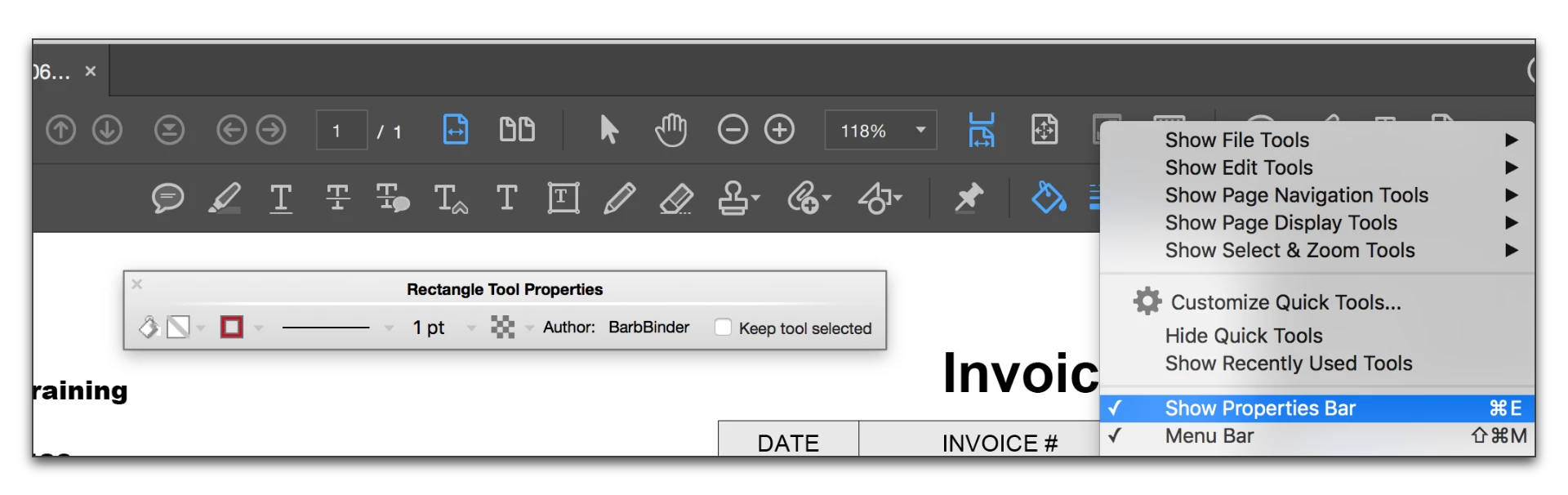
How can I change the color of the rectangle? My Acrobat Pro DC isn't showing the color bucket


Right click the topmost toolbar and select Show Properties Bar:

2 replies

Barb Binder
Community Expert
Community Expert
December 3, 2016

I don't think you want to be doing that in Acrobat because how precise would that be? If it were me, I'd ask those providing PDFs to put the crop marks in as they make the PDFs. It's just checkboxes!

In InDesign

File > Export > PDF (Print)

In Marks and Bleeds, ask them to check Crop Marks

In Photoshop

File > Print

Under Printing marks, enable corner and center crop marks.

~Barb at Rocky Mountain Training
Participant
December 19, 2016

crop marks does not print a visual boundary.

I often get pdfs before a meeting that I am presenting them to. I don't have time to go back to the outside contractors to add a stroke.

Barb Binder
Community Expert
Community Expert
December 19, 2016

If precision isn't important, you can use the Drawing Markup tools (under Commenting) to add a rectangle:

~Barb at Rocky Mountain Training
Community Manager
December 2, 2016

Hi Jackieseow,

Apologies i may not have understood the question.

Please share the workflow you are following and what you are trying to accomplish and if you are referring to printing a file with the stroked text then, that is not an option in the application.

However, for reading purpose you may try these steps and see if it works:

Go to Edit>Preferences>Accessibility>Check mark the "Replace Document Colors" option>Page Background>Choose the color and save the changes.

  
Thanks,

Supriya

Participant
December 2, 2016

I'm actually working in Acrobat Pro and this is regarding printing a file.

I'm a art director and I get comps sent to me via pdf. The page sizes are usually set at 6 x 9. Unless the designer placed a black holding rule to the 6 x 9 size in either photoshop or indesign, when they create the pdf, the white or light background has no edge or restraining rule when I print it out on a letter sized page.

So my question was whether you are able to add a stroke to the "page" size in the pdf?

~graffiti
Legend
December 3, 2016

Are you trying to add crop marks or something like that?