


Participant
September 28, 2021
Question

Cannot Change Page Size after Select Custom

  • September 28, 2021
  • 1 reply
  • 546 views

The format of my File is 4x6".

But when the file open with Adobe Acrobat Reader DC, it automatically shows on a page 8.5x11".

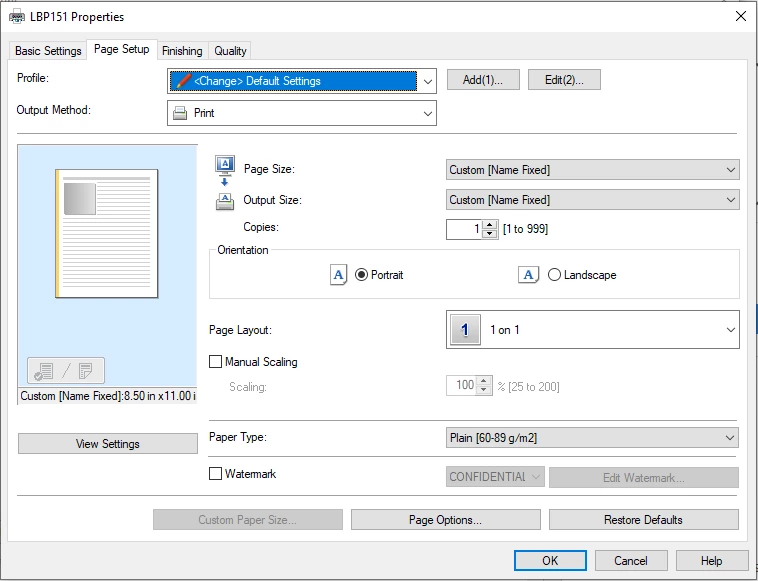
I want it show automatically full page by 4x6" instead of 8.5x11", so I go by File|Print|Properties|Page Setup|Page Size|Custom [Name Fixed], trying to change my default page size.

It shows like the below screenshot, my custom option is fixed, I cannot change.

Please help to figure this out.
This topic has been closed for replies.

1 reply

Amal.
Community Manager
Community Manager
September 28, 2021

Hi there


Hope you are doing well and sorry for the trouble. As I understand from the description, you are trying to create a custom page size for a document


Adobe Acrobat Reader DC is a freeware application with limited functionality. It us used to read, view, annotate and fill & Sign the PDF files. The option to create the custom page size is available Adobe Acrobat 2017, Adobe Acrobat 2020 and Adobe Acrobat DC.

For additional information to know how, you may check the help page https://helpx.adobe.com/acrobat/using/using-pdf-printer.html


Regards

Amal