


Dunconomics
Participant
July 13, 2015
Answered

Cannot disable Reader DC IE Plugin

  • July 13, 2015
  • 3 replies
  • 30811 views

I am trying to disable Adobe Reader DC Internet Explorer plugin on about 100 computers. I need Adobe Reader to run inderpendantly. I can do this with other apps via Group Policy but not with Adobe Reader.


If I disable the ActiveX pluging manally like so (as per Acrobat Help | Display PDF in browser | Acrobat DC, Acrobat Reader DC😞
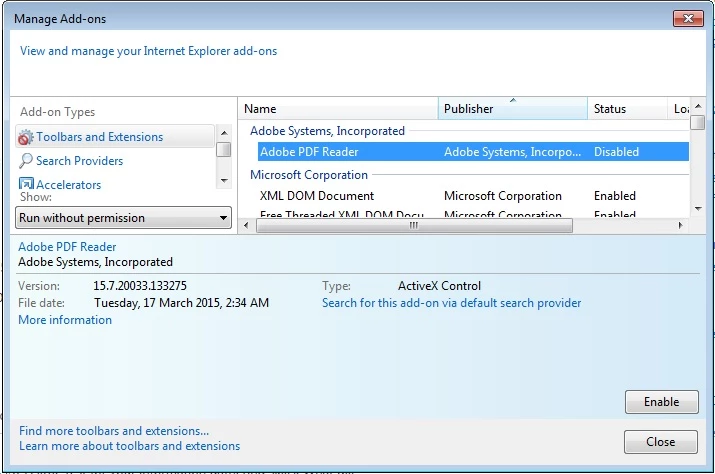
...PDF documents still open from within the browser. I can see Reader is running within Internet Explorer:

How can I disable the plugin?
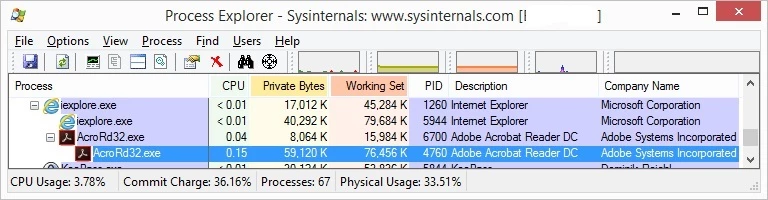
Version details:

I am running Windows 8.1 64-bit but I am having the same problem on other Windows 7 SP1 32-bit PCs.

Adobe Reader version 2015.007.20033

Internet Explorer 11.0.9600.17842

This topic has been closed for replies.
Correct answer erice44104833

Disabling the IE plugin still works in Reader XI v. 11.0.13 (at least for me). If this functionality is critical, you could probably downgrade quicker than Adobe can get their rear in gear.


Downgrade isn't an option with their licensing unfortunately

What is an option is adjusting the following registry key:

HKCU\Software\Microsoft\Windows\CurrentVersion\Ext\Settings\{CA8A9780-280D-11CF-A24D-444553540000}

There is a value under there called Flags. Toggling that to REG_DWORD 0x00000001 (1) seems to disable the plugin in IE.

3 replies

Participant
February 15, 2021

Hello,

Thank you everyone who has taken the time to reply in here. This has been an issue for me as i have a program which ties into windows explorer and thus internet explorer.

I did a combination of a few things i have found on the internet.

Locate the msi package. If you are using just plain old acrobat reader try searching for the file acroread.msi on your hard drive.

If you cant find it it might be something like AcroPro.msi. (ultimately if you are windows saavy try going into the control panel find the exact spelling of the adobe product you are using and search in the registry for the name under HKEY_CLASSES_ROOT\Installer\Products\
Under SourceList you should be able to find the "Package Name". Then search for the package on your hard drive.

Then run the the following command line, substituting in the corresponding location of your msi package (you can also add /q to the end of it for a quiet install).

msiexec /i C:\ProgramData\Adobe\Setup\{AC76BA86-7AD7-1033-7B44-AC0F074E4100}\AcroRead.msi REMOVE=ReaderBrowserIntegration

Good Luck.
Now i just have to work out how to get internet explorer to save the file to hard disk instead of automatically opening it externally in adobe reader, although if you have another PDF viewer set as default it wont try to automatically open it automatically and gives you the save option.

Participant
August 11, 2017

Has anyone been able to solve this? 

I am having this issue with multiple systems.  I have tried all of the registry entries reccomendations.  None of them solve this issue.  My internet explorer plugin is disabled but I still cannot get pdf's to open outside the browser. 

Participant
February 7, 2020

Under HKCU\Software\Microsoft\Windows\CurrentVersion\Ext\Settings\{CA8A9780-280D-11CF-A24D-444553540000} is a key called "iexplore". I found deleting this key to be the solution of keeping Adobe Disabled, actually completely gone from Internet Explorer add-ons.


You might want to back up your Registry before trying this.

Participant
July 7, 2020

 looked up that path in the registry and that CLSID doesnt exist - is there another CLSID for 2020.009.20067?

Anubha Goel
Community Manager
Community Manager
July 13, 2015

Hey duncanw98209516,

Could you please choose All add-ons under Show label on the left hand side and then disable Adobe PDF Reader from the list of add-ons.

Let me know how it goes.

Regards,

Anubha

Dunconomics
Participant
July 14, 2015

Thanks for the suggestion Anubha.

Unfortunately, Adobe PDF Reader is not listed in the 'All add-ons' list which is why I selected 'Run without Permission'. This is what Adobe's article instructed.

I was able to see the add-on via third party utility, ActiveX Compatibility Manager. I can disable it but Adobe Reader still runs.

Anubha Goel
Community Manager
Community Manager
August 13, 2015

Hey duncanw98209516,

Sorry for the delay in my response.

Let me know if your issue is resolved.

If disabling Adobe Reader plugin manually did not solve your problem, then please try adding the following key in the registry editor and see if that helps.

Open the Windows registry and go to [HKEY_CURRENT_USER\Software\Adobe\Acrobat Reader\DC\Originals]

"bBrowserIntegration"=dword:00000000

Let me know.

Regards,

Anubha