Participating Frequently
November 23, 2018
Answered

Cannot install Acrobat Reader

  • November 23, 2018
  • 1 reply
  • 1821 views

Hi,

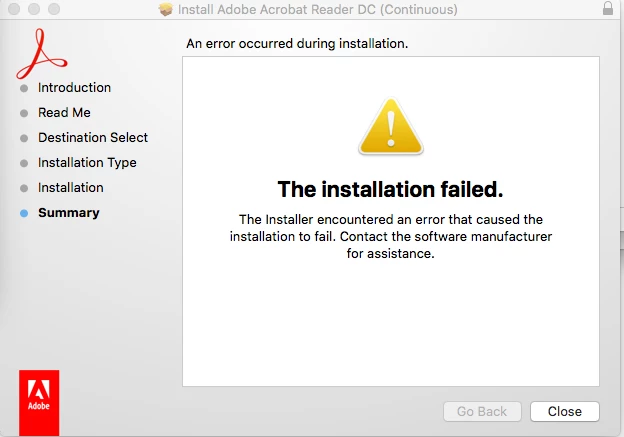
Ive just installed a new hard drive on my Mac and reinstalling all my software from scratch.  I have tried for the last few days to install Acrobat Reader with no luck.  It makes like its installing and then it stop when it gets to the scripts and throws out an error message  and then it fails:

This is a brand new installation so there were no pre-existing Adobe apps.  I really need Acrobat to work.  Any suggestions?

Any assistance would be appreciated.

Thank you.

Rute

This topic has been closed for replies.
Correct answer Tariq Ahmad

Hi Rute,

Sorry for the inconvenience caused.

There is a good possibility if you have restored your backup of the old drive, some of the fragments of the old installation might have came over to the new drive. You may use Adobe Acrobat cleaner tools to remove the leftovers from the machine:  Download Adobe Reader and Acrobat Cleaner Tool - Adobe Labs restart the machine and try again. Before you restart, please check the applications folder and see if there are remnants of Reader. Also, check the trash bin.

Let us know if that works for you.

-Tariq Dar

1 reply

Tariq AhmadCommunity ManagerCorrect answer
Community Manager
November 28, 2018

Hi Rute,

Sorry for the inconvenience caused.

There is a good possibility if you have restored your backup of the old drive, some of the fragments of the old installation might have came over to the new drive. You may use Adobe Acrobat cleaner tools to remove the leftovers from the machine:  Download Adobe Reader and Acrobat Cleaner Tool - Adobe Labs restart the machine and try again. Before you restart, please check the applications folder and see if there are remnants of Reader. Also, check the trash bin.

Let us know if that works for you.

-Tariq Dar

Leo_za1Author
Participating Frequently
December 1, 2018

Hi Tariq,

Thanks for your assistance. 

I didn't restore any backup.  I installed a brand new ssd hard drive and started installing from scratch so I wouldn't inherit any errors from my previous drive, therefore this is a brand new installation of Adobe Reader which means there won't be any remnants from a previous installation.

It occurred to me that perhaps it has something to do with permissions, so I will also explore that route.  If it doesn't work, then I will try the cleaner tool and revert back with a response. 

Thank you

Rute

Community Manager
December 3, 2018

Thank you for your response, Rute.

Please keep us updated with your findings.

-Tariq