Participating Frequently
May 4, 2018
Answered

Cannot see the signature panel

  • May 4, 2018
  • 4 replies
  • 28951 views

I would like to check digital signature in my documents opening them in Acrobat Reader DC (2018-011.20038).

But when I open my file (.p7m) I cannot see the Signaure panel I should have seen on the left.

I've already checked View > Show/Hide > Navigation Panes but there is no Signature Panel option.

I've also checked the Signature Verification Preferences

Someone can help me?
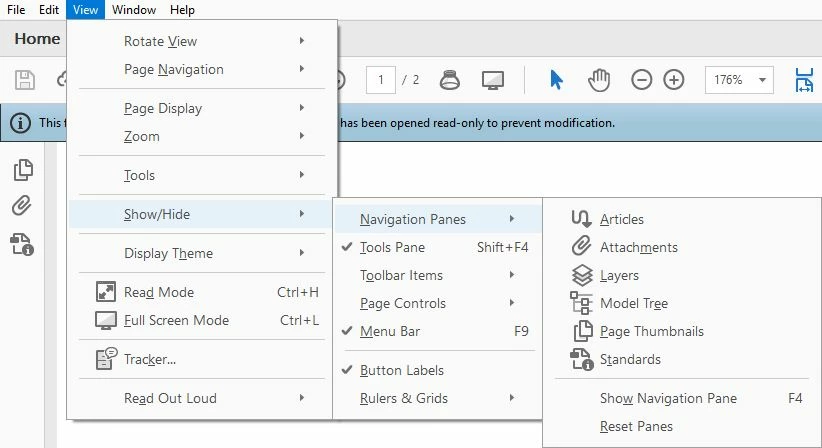
This topic has been closed for replies.
Correct answer try67

This is what I see if i clickon the standard panel


You can't edit a PDF/A file... That's the entire point of it. The "/A" stands for Archive.

4 replies

cadbury
Adobe Employee
Adobe Employee
September 17, 2018

Dear user,

Do you have an "Enable Editing" button the top blue bar? Please click on the button to enable Editing of PDF-A compliant files to check if the signature becomes visible. However if the files already had a signature , the signature icon should be visible in the LeftHandPanel like

with the option to expand signature panel.

Have you created the pdf and the signature using Acrobat or with any other third party tool.? Please could you create a similar non official document in the same way you created this file and share it with us for analyzing the issue.

Vguar
Participant
May 18, 2018

I seem to be in the same situation:

- file.pdf.p7m

- signature seen by InfoCert online service, marked as valid, coming from ArubaCERT

- Reader DC opens upon double-click, allows seeing/printing the doc ( a scanned page), but no signature or standard pane is accessible anywhere.

- BTW, no sign of PDF/A compliant doc.

Possible explanations?

a) scanned PDF is not PDF/A, so Reader does not even try looking at signatures

b) signature from ARUBA, an Italian service, is recognized by InfoCert, an Italian service, but not recognised by Reader?

c) other?

hardikt22169037
Participant
May 7, 2018

Did you tried re-installing the adobe reader?

Bernd Alheit
Community Expert
Community Expert
May 4, 2018

This is not possible with this PDF file. Try a other PDF file.

Participating Frequently
May 4, 2018

I've tried with several files and the same files are verifiable with other software or online applications.

Bernd Alheit
Community Expert
Community Expert
May 4, 2018

Not possible with Acrobat Reader and this special file.