
sharla_la
Participant
August 7, 2019
Question

Cannot Upload Image File for Signature

  • August 7, 2019
  • 2 replies
  • 10726 views

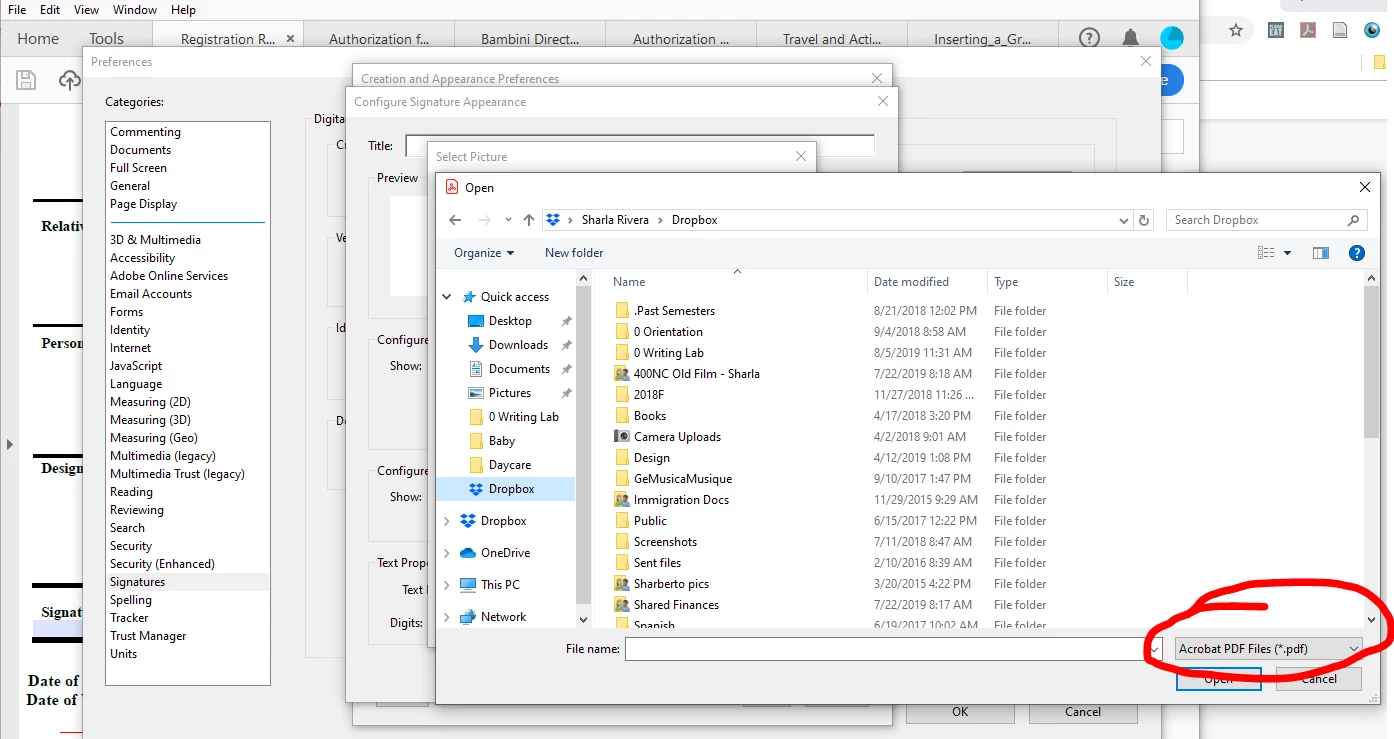
I'm trying to add a signature to my Adobe account in Adobe Reader DC. I have a PNG of my signature, but when I try to upload it, I can't because uploads are limited to PDF file types (?). There are no other options in the drop-down. This happens whether I go through Preferences or try to sign a document directly. Any guidance on how to upload the PNG of my signature?
2 replies

Bernd Alheit
Community Expert
Community Expert
August 8, 2019

There you can only PDF files. In Adobe Acrobat you can use PDF files and image files.

AkanchhaS8194121
Legend
August 8, 2019

Hi Sharla,

There are several methods to apply signature on a document, which one to choose that depends on how the signature files has been set-up or what kind of signature has been requested.

Looking at the screenshot, I believe you have been trying to set-up a signature image for Digital Signature? Or you are just willing to add a signature image to use any time you sign the document?

  • The method you have been following is to predefined digital signature and there you can only add .pdf format.

  • You may use Fill & Sign tool>Sign>Add signature>Image>select Image>OK>Apply

Hope this helps!

Thanks,

Akanchha

Participant
April 19, 2022

Hi.

If I click "Select image" and i select a jpg file then nothing happens! The file selection window closed but the jpg file doesn't inserted.

Any idea what is wrong?

I use the the latest Adobe Reader DC verson as of today.