
Participant
June 22, 2023
Question

cannot upload image when customizing signature apperance

  • June 22, 2023
  • 2 replies
  • 1310 views

After an Adobe update last month its not possible any more to upload am image (png, jpg..) the only possibility when I click "Browse" and the directory strucrure in Windows opens, only pdf files are allowed, there is not the possiblity to change the file typ.
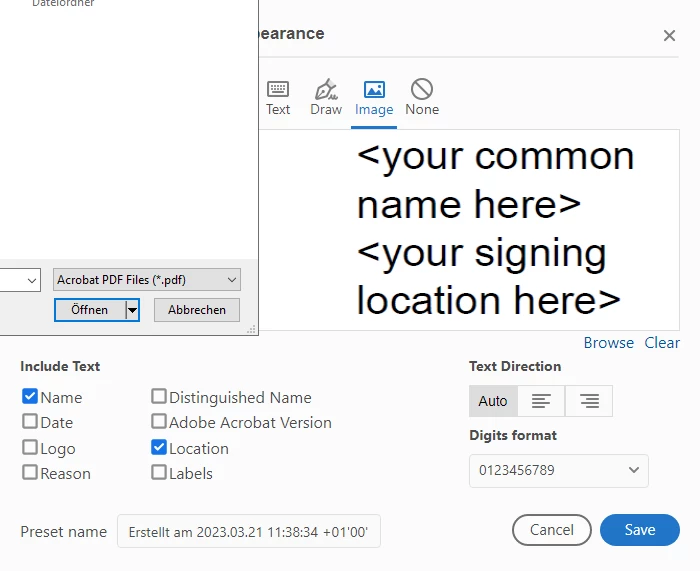
 

This topic has been closed for replies.

2 replies

Bernd Alheit
Community Expert
Community Expert
June 23, 2023

Does you use Acrobat Reader or Adobe Acrobat?

Participant
June 26, 2023

I use Adobe Reader

Bernd Alheit
Community Expert
Community Expert
June 26, 2023

In Acrobat Reader you can only use PDF files.

AkanchhaS8194121
Legend
June 22, 2023

Hi @Katja30658842w6gb 


Thanks for sharing the image.

You seem to be applying the digital signature in the screenshot shared above. What if you click the arrow next to Adobe pdf on the browse window? Does it give the dropdown menu?

Check on the Fill & Sign > add signature> Image option. 

Can you select jpeg here?

Check with a different document, as it could be file specific issue. 


Thanks,

Akanchha

Participant
June 26, 2023

Hi,

there is a dropdown with one entry and thats also pdf. I checked on different computers and with different files, always the same thing, no jpg, png other other image option.