Participant
Jul 13, 2021 8:57 AM UTC
Answered

Changing the font in the fill and sign function

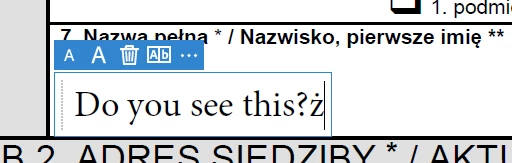
When filling in the document, the program uses a font with the Greek alphabet, only when I use a Polish diacritic mark, the font changes to the correct one. Please help me because I have already searched half of the internet. 
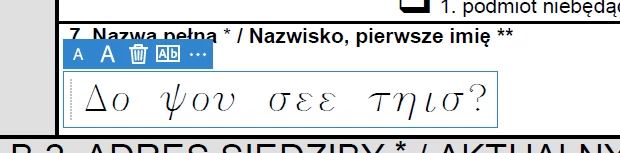
 

Adobe Reader DC 2021.005.20048

Windows 10 x64


Amal.
Amal.Correct answer
Legend
Jul 14, 2021 5:45 AM UTC

Hi Michalowr


Hope you are doing well and sorry for the trouble.


This issue has been fixed in the optional update version 21.05.20054. Please download the patch manually from the link https://www.adobe.com/devnet-docs/acrobatetk/tools/ReleaseNotesDC/index.html and reboot the computer once after updating the application and check.


Regards

Amal

24 replies

Solarion
Participant
Feb 4, 2026 9:18 AM UTC

Hello everyone,


I use Adobe Acrobat Reader to work with PDF documents, and sometimes I need to write in a document that was not created as editable. To write in such a document, I use the "Fill & Sign" tool. However, this tool has an annoying feature: when you type a character with a diacritical mark into the text field, the font in the entire field suddenly changes, as shown in the image below. Do you know how to prevent this behavior?

I repaired the installation using the Help tab, but the font change problem persists.

I have Adobe Acrobat Reader installed on Windows 10 Pro 22H2, Reader version is Continuous Release | Version 2025.001.21151 | 64-bit. Attached are files created by the Log Collector Tool diagnostic tool.

Two posts here contain a link to a patch that should solve the problem. However, the patch is designed for a 32-bit system, and I have a 64-bit system, so I cannot install it.


Translate
Participant
Jul 26, 2025 11:06 AM UTC

I have a similar situation with the Russian language.
Different fonts are used for Russian and English input languages.
When entering a Russian character, the font changes throughout the text field.
Attached a screen recording.

Translate
Legend
Jul 28, 2025 4:42 PM UTC

Hi @Hallow Fan, 


Sorry for the troubled experience. 
I have seen your other post and I have requested the information that we need before discussing this internally with our product team.


Best regards,
Tariq | Adobe Community Team

Translate
Participant
Feb 19, 2024 7:45 AM UTC

Such a simple problem and its still not fixed...

Translate
Participating Frequently
Feb 19, 2024 8:17 AM UTC

True, new look & feel, but fill & sign tool still not fixed.

Translate
Amal.
Legend
Feb 19, 2024 10:57 AM UTC

Hi there


Hope you are doing well.


Have you started experiencing this issue recently?


What is the version of the OS and  Acrobat DC you are using?

To check the version go to Help > About Acrobat and make sure you have the recent version 23.08.20533 installed. Go to Help > Check for updates and reboot the computer once.

Also try to repair the installation from the help menu (Win Only) and see if that works.


If it still doesn't work , Would you mind collecting the Adobe CC logs https://helpx.adobe.com/creative-cloud/kb/cc-log-collector.html  , Procmon logs (Win Only) https://www.adobe.com/devnet-docs/acrobatetk/tools/Labs/acromonitor.html and share them via any cloud storage of your choice. Just upload the log file to the cloud and generate the link and share that link with us for further investigation.

Regards
Amal

Translate
Participating Frequently
Jun 30, 2023 10:51 PM UTC

That update doesn't allow you to change the font within the fill & sign tool, best I can tell no way to do this and if you use the fill & sign tool you will be stuck with the font they built in for the tool. 

Translate
Participant
Jun 16, 2022 11:23 AM UTC

Same here using Hungarian special characters like 'ő' and 'ű'. Default font is sans-serif, then it switches to serif when I type a Hungarian character. Also, font size is randomized for each field. My forms look like they were filled by a child who can't use the computer at all.

Translate
Amal.
Legend
Jun 16, 2022 2:14 PM UTC

Hi there


Hope you are doing well and sorry to hear that.


Would you mind sharing the version of the Acrobat DC you are using? To check the version go to Help > About Acrobat and make sure you have the recent version 22.1.20142 installed. Go to Help > Check for updates and reboot the computer once.


Regards

Amal

Translate
michalowrAuthor
Participant
Aug 26, 2022 5:39 AM UTC

In the 2022.002.20191 x64 version, the problem still exists. Are you planning to fix it?


Regards

michalowr

Translate
Participating Frequently
Nov 8, 2021 8:01 AM UTC

Similar but not such "spectacular" effect can still be reproduced in current Reader version (2021.007.20099).

The sans-serif font (Arial?) is used by default.

But when I insert Polish special character (e.g. ąćęłńóśśżź) the font changes to serif (Times?)

Since there is no option to change the font-face of filled fields the form looks weird with some fields with sans-serif and some fields with serif fonts.

Translate
Amal.
Legend
Nov 8, 2021 12:27 PM UTC

Hi there


Hope you are doing well and sorry to hear that.


Would you mind sharing the Version of the OS you are using? Also please share the small video recording of the issue so that we can check it at our end.


You may also try to create a new test user profile with full admin rights in Windows or enable the root account in Mac and try using the application there and check.


Regards

Amal

Translate
Participating Frequently
Nov 8, 2021 12:53 PM UTC

Thank You for quick response.

  • I'm using Windows 10 Pro 21H1 (build: 19043.1320)
  • I'm using Adobe Reade using account with full admin rights (even with UAC disabled)

Please find attached the small video recording of the issue.

It demonstrates the change from "sans-serif" to "serif" and from "fixed-with" to "serif" also.


Kind regards, TNO.


Translate
Amal.
Amal.Correct answer
Legend
Jul 14, 2021 5:45 AM UTC

Hi Michalowr


Hope you are doing well and sorry for the trouble.


This issue has been fixed in the optional update version 21.05.20054. Please download the patch manually from the link https://www.adobe.com/devnet-docs/acrobatetk/tools/ReleaseNotesDC/index.html and reboot the computer once after updating the application and check.


Regards

Amal

Translate
michalowrAuthor
Participant
Jul 14, 2021 6:36 AM UTC

Thank You very much, installing the update solved the problem.

Translate