
Participating Frequently
March 21, 2022
Question

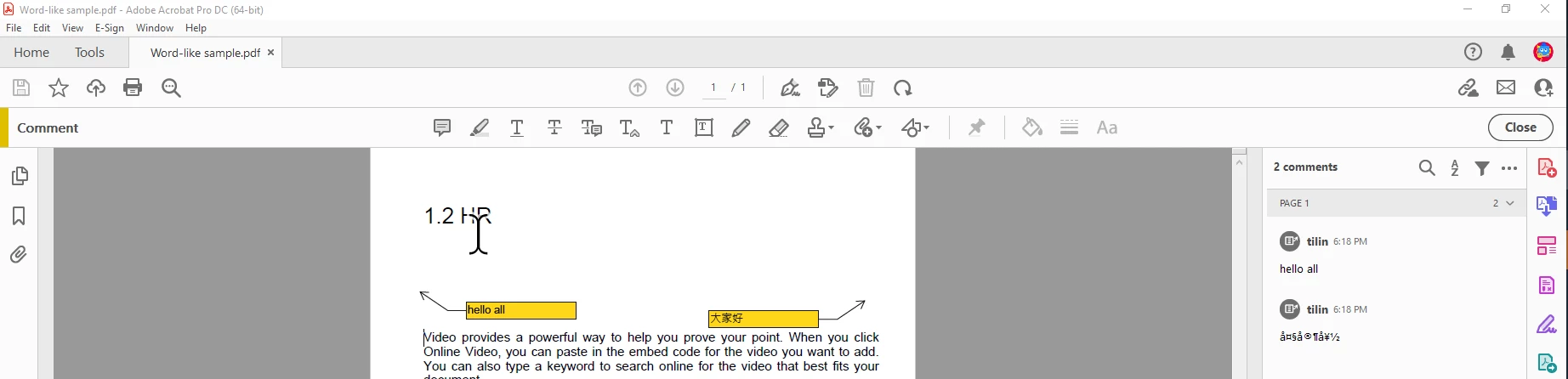
Chinse character always garbled in the comment section

  • March 21, 2022
  • 2 replies
  • 715 views

Our firm always with some docs handled by Nitro Pro. When people have ever added Chinese comments in the call out of Nitro Pro, it will display as garbled in Acrobat Reader. Hope this could be solved?

Attached a sample for troubleshooting. Thanks.
 

This topic has been closed for replies.

2 replies

Participating Frequently
May 12, 2022

That's it? Does anyone have a similar issue?

Legend
March 21, 2022

It seems one of the two apps is doing this wrong. Part of the challenge is to find which app is wrong. What does the sample show? I don't see anything garbled in the screen shot. I see two yellow boxes, one with Latin characters and one with what may be Kanji. 

Participating Frequently
March 22, 2022

Hi,

If you look at it carefully. What is shown on the page itself is not equal to the comment section. Obviously, the comment section is garbled. I would say Abode should do something. If it can display the text correctly in one place, should be able to do it in another as well.


Participating Frequently
March 29, 2022

Anyone knows please?