JoSch
Participant
December 19, 2018
Question

Close Share Pane does not work

  • December 19, 2018
  • 1 reply
  • 394 views

In Adobe Acrobat Reader DC 19.010.20064 we are not able to close the share pane while clicking on "X". Nothing happens.
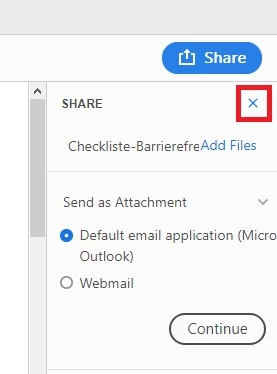
anyone with any ideas?

This topic has been closed for replies.

1 reply

AnandSri
Legend
December 20, 2018

Hello JoSch,

We're sorry for the trouble you had with Adobe Reader, please reboot the machine once and check. I tried replicating the issue at my end on Windows 10 as well as on Mac, and I am able to close the window.

It seems to be a temporary glitch, assuming you are on Windows machine, please repair the installation files of Adobe Reader once from help>repair installation. Reboot the machine after repair and check again.

Are you on Mac on Windows machine and what is the version?

Are you getting this issue on all the PDF files or is it with a specific PDF file?

Let us know how it goes and share your observation.

Thanks,

Anand Sri.

JoSch
JoSchAuthor
Participant
December 21, 2018

Hello AnandSri,

thank you for your answer.

Rebooting does not help. We are having this issue on all our Adobe Reader Windows installations and with different PDF Files.

On a not company PC it is wokring so maybe its caused by a special Adobe Setting.

I also noticed on the not company PC the following screen is shown, which is not available on our company PCs.

JoSch