
Participant
January 30, 2020
Answered

Color Rendering problem

  • January 30, 2020
  • 1 reply
  • 1605 views

My Acrobat Reader started display colors wrong. 
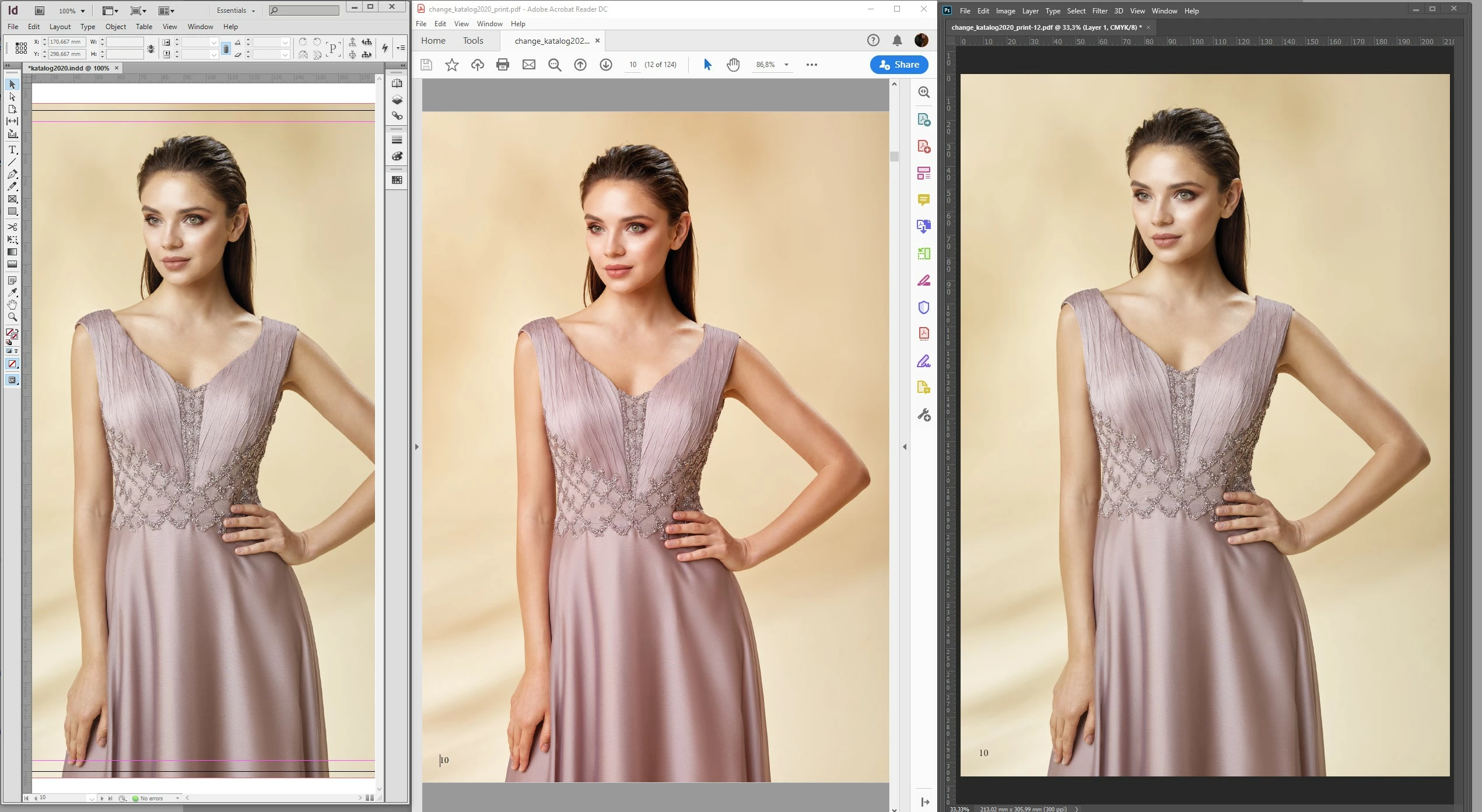
As u can see in the screenshot, the colors are too oversaturated in Acrobat reader. I'm working for many years in the same conditions, didn't happen before. I don't know even if it is because of a Windows update or Acrobat update but can't get color accuracy anymore.

System: Windows 10 Pro, version:1909

Acrobat: Latest Acrobat Reader DC

Display: BenQ SW2700PT Wide gamut display, always calibrated with i1 Pro.


This topic has been closed for replies.
Correct answer xpunctum

SOLVED:

Just changed resolution at preferences from custom to use system settings and colors are perfect now.
Edit >preferences >page display >resolution >use system settings

1 reply

xpunctumAuthorCorrect answer
Participant
January 30, 2020

SOLVED:

Just changed resolution at preferences from custom to use system settings and colors are perfect now.
Edit >preferences >page display >resolution >use system settings

giovannia98509741
Known Participant
March 2, 2020

I am having the same problem but your solution didn't help. Anyone with the same issue?