Participant
October 5, 2018
Answered

Comment

  • October 5, 2018
  • 1 reply
  • 604 views

In the Comment tool, the highlight text (pencil icon second from left) does not work.

Or maybe I'm missing something?

Brad

    This topic has been closed for replies.
    Correct answer AkanchhaS8194121

    Hey Brad,

    We apologize for not being able to address your query on time.

    1. If you are still experiencing the same issue, then you may check the current version of Adobe Reader DC you are working on.

    Open Adobe Reader>Help>About Adobe Reader

    If you have started experiencing this problem immediate after Oct release, then you may install the latest patch of Adobe Reader DC Release Notes — Release Notes for Acrobat DC Products

       2. Still can't find the highlighting tool, then you may Open PDF>Comment>right click on comment toolbar>Customize Comments Toolbar and see whether you have any customization in Toolbar or not.
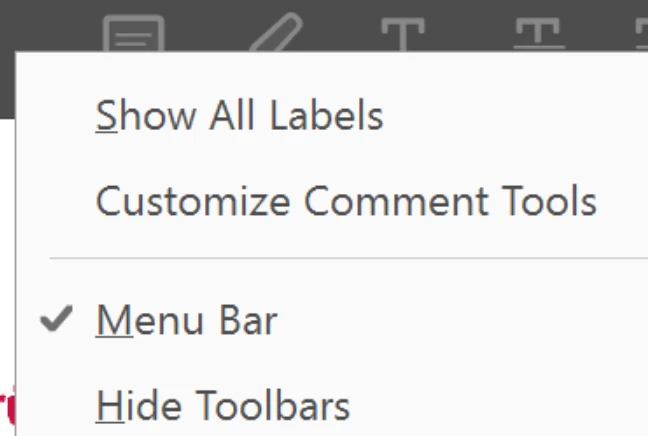
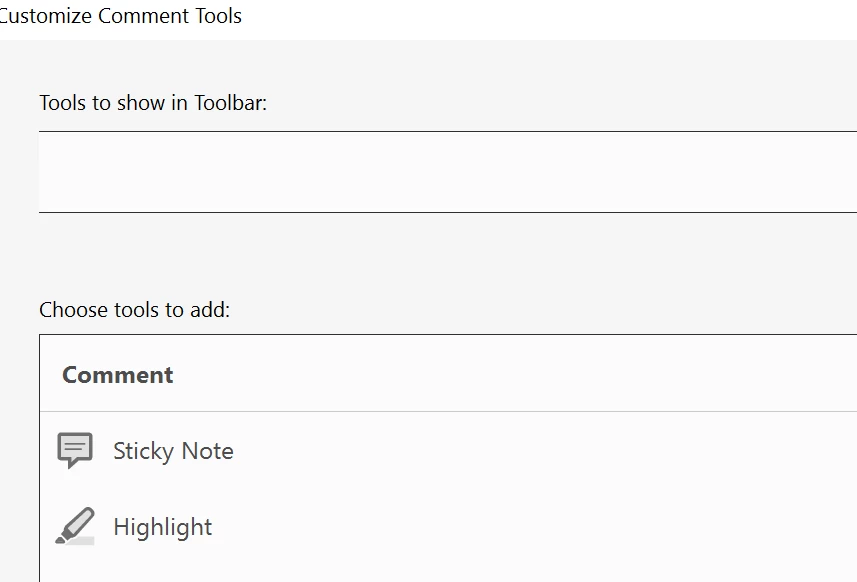
    • If yes, then you may see whether there is any specific list of comment tool is added or its blank? By default all the commenting tools should be available in the toolbar. So, there shouldn't be any customization here.

       3. Use cleaner tool to remove the application completely- Download Adobe Reader and Acrobat Cleaner Tool - Adobe Labs  and reinstall it- Adobe Acrobat Reader DC Install for all versions

    Regards,

    Akanchha

    1 reply

    AkanchhaS8194121
    AkanchhaS8194121Correct answer
    Legend
    December 11, 2018

    Hey Brad,

    We apologize for not being able to address your query on time.

    1. If you are still experiencing the same issue, then you may check the current version of Adobe Reader DC you are working on.

    Open Adobe Reader>Help>About Adobe Reader

    If you have started experiencing this problem immediate after Oct release, then you may install the latest patch of Adobe Reader DC Release Notes — Release Notes for Acrobat DC Products

       2. Still can't find the highlighting tool, then you may Open PDF>Comment>right click on comment toolbar>Customize Comments Toolbar and see whether you have any customization in Toolbar or not.

    • If yes, then you may see whether there is any specific list of comment tool is added or its blank? By default all the commenting tools should be available in the toolbar. So, there shouldn't be any customization here.

       3. Use cleaner tool to remove the application completely- Download Adobe Reader and Acrobat Cleaner Tool - Adobe Labs  and reinstall it- Adobe Acrobat Reader DC Install for all versions

    Regards,

    Akanchha