Hello @MGAraya,
I hope you are doing well, and thanks for reaching out. We're sorry for the trouble you had.
Could you please share more details about the issue?
What is the version of Acrobat/Reader installed? Check from Mennu (Windows)| Acrobat(Mac) > Help > About Adobe Acrobat.
What operating system is affected: Windows or macOS?
Does the problem occur with this specific PDF only, or with any PDF that contains a ZIP attachment?
Are the users in a managed enterprise environment with security policies applied to Acrobat, or is this a standalone installation?
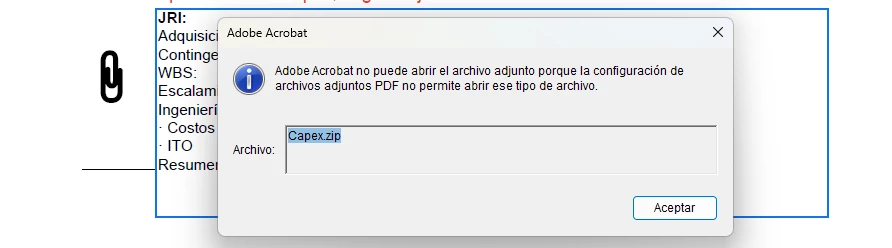
Please note that Acrobat is blocking the embedded .zip attachment because the current PDF File Attachments security settings do not allow that file type to be opened or saved from the PDF.
Suggestions:
Open the Attachments panel using the current Acrobat path.
Windows: Menu > View > Show/Hide > Side panels > Attachments
macOS: View > Show/Hide > Side panels > Attachments
Then right-click the ZIP attachment and choose Open Attachment. Adobe documents this as the current path for accessing PDF attachments in Acrobat.
Check the PDF File Attachments preference.
Acrobat has a Trust Manager setting that controls whether non-PDF attachments can open in their native applications:
Windows: Menu > Preferences > Trust Manager > PDF File Attachments
macOS: Acrobat > Preferences > Trust Manager > PDF File Attachments
Confirm whether Allow opening of non-PDF file attachments with external applications is enabled
Important: ZIP files may still be blocked even when that preference is enabled.
If this is a managed company machine, check with IT/security. In enterprise deployments, administrators can customise and lock attachment behaviour. Adobe’s enterprise documentation describes policy controls such as iFileAttachmentPerms and tBuiltInPermList, including options to prevent opening/launching non-PDF and non-FDF attachments, or to modify file-type permissions centrally. If the Trust Manager attachment options are unavailable or greyed out, that usually points to an administrator-managed policy rather than a document-level setting. Please check these articles for more details: https://adobe.ly/4wGKT1H
https://adobe.ly/3RyG5fA
Security note: .zip is blocked precisely because archives can carry malware, so if you do allow it, limit it to trusted senders and keep endpoint protection active. For a mining/engineering environment, you may prefer to leave the blacklist as-is and standardise on the browser-extract method.
Please try the suggestions, and let us know how it goes, and reach out if you need any assistance.
Regards,
Anand Sri.




 AdChoices