
Participating Frequently
March 7, 2022
Question

Configure the Home view

  • March 7, 2022
  • 1 reply
  • 433 views

Hi everybody,


I try the functions of Adobe Reader DC 2021(installed on Windows Server 2012 64bit) and I see in the home view a "getting started card" with the information to use the Adobe Acrobat DC. This is a little problem for my company, because not everybody in our company should see this information.
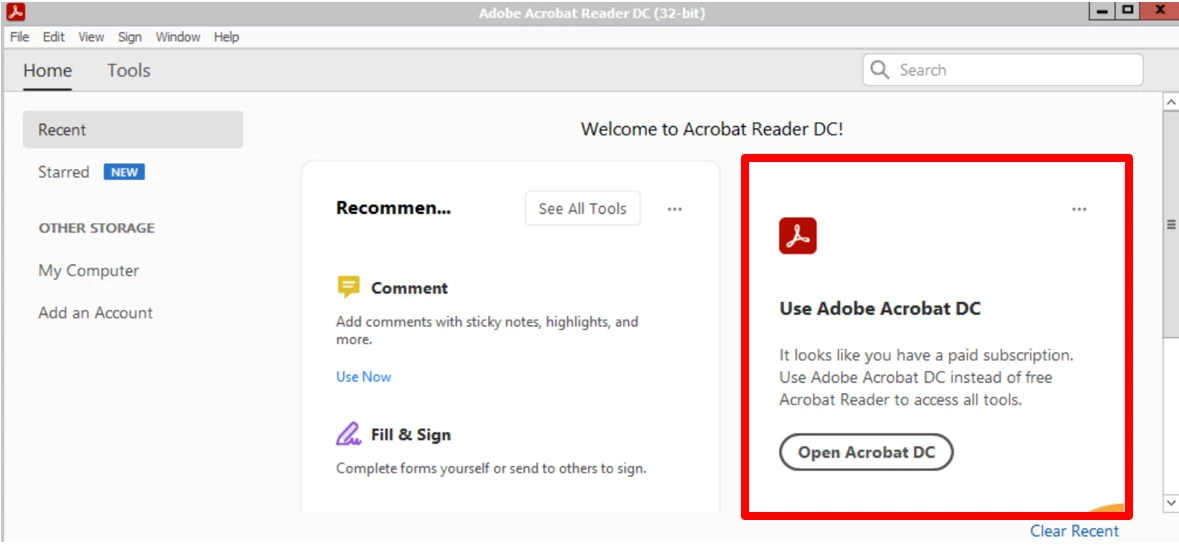
 

Is it possible to deaktivate only this information/frame?


Thanks a lot.

Ralf

This topic has been closed for replies.

1 reply

Amal.
Legend
March 8, 2022

Hi Ralf


Hope you are doing well and sorry to hear that.


It is generally not recommended to use Acrobat Reader and Acrobat Pro on the same machine as Acrobat pro is the super set of Acrobat Reader DC application.


As in your case since you have Acrobat Pro DC application with the same Adobe ID the Acrobat Reader is giving you the prompt to use its advanced version Acrobat Pro DC.


Also, please go through the help page https://helpx.adobe.com/acrobat/kb/about-acrobat-reader-dc-migration-to-64-bit.html and see if that helps.


Regards

Amal