


pauloadilson
Participant
February 20, 2018
Answered

Context menu for pt-br Adobe Reader with same short-cut for different functions

  • February 20, 2018
  • 1 reply
  • 723 views

I have the Adober Reader version 2018.011.20036 installed under my 64bit windows 10 computer.

The righ-click context menu have this issue. After right-clicking a highlighted text the context menu shows two different functions to the same letter short-cut (T), as it can be seen in the image bellow.
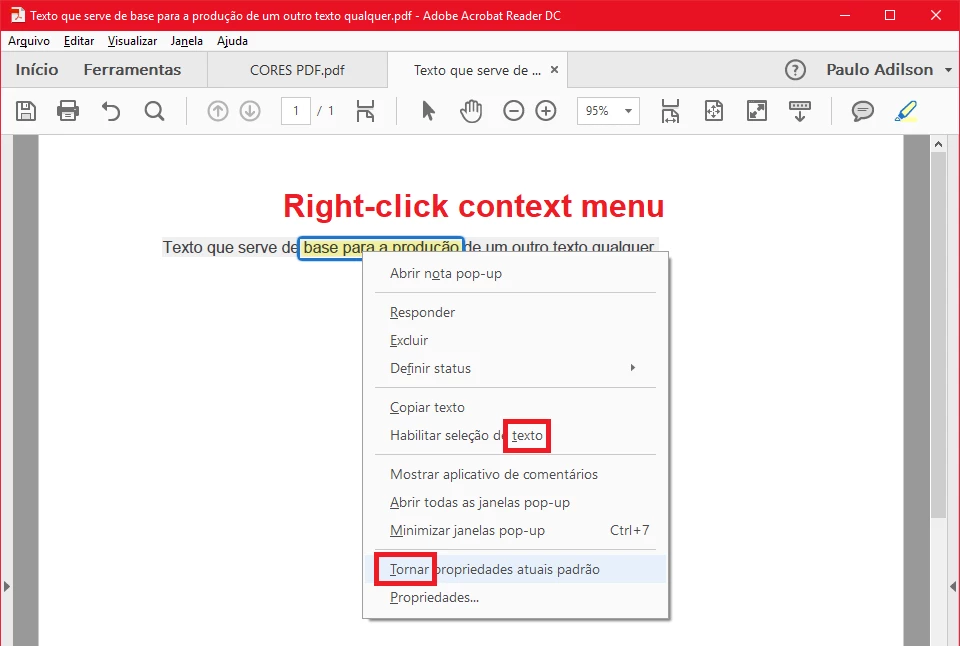
The functions are "Habilitar seleção de texto" and "Tornar propriedades atuais padrão".

I have no idea how to contact Adobe to correct it in the pt-br version and I don't know if the other versions have the same problem.

I hope somebody can help. Thanks

This topic has been closed for replies.
Correct answer aharis92

Hi,

Thanks for reporting the issue!

We have taken this is in our backlog and will update once we plan to deliver the fix.

You can always reach our forum in case of any further issues.

Thanks,

Ammar

1 reply

aharis92
aharis92Correct answer
Participating Frequently
February 21, 2018

Hi,

Thanks for reporting the issue!

We have taken this is in our backlog and will update once we plan to deliver the fix.

You can always reach our forum in case of any further issues.

Thanks,

Ammar

pauloadilson
Participant
May 17, 2018

Hello Ammar aharis92​. The Adobe Reader was updated, but unfortunately the issue was not corrected. Is there any information on when it could happen?

Thanks.

Paulo