

abdul sahibm79488992
Participating Frequently
November 26, 2022
Answered

Convert pdf to word / No Arabic!

  • November 26, 2022
  • 2 replies
  • 8420 views

I set the language support settings for the Arabic language in Creative Cloud by performing this video to apply the steps.

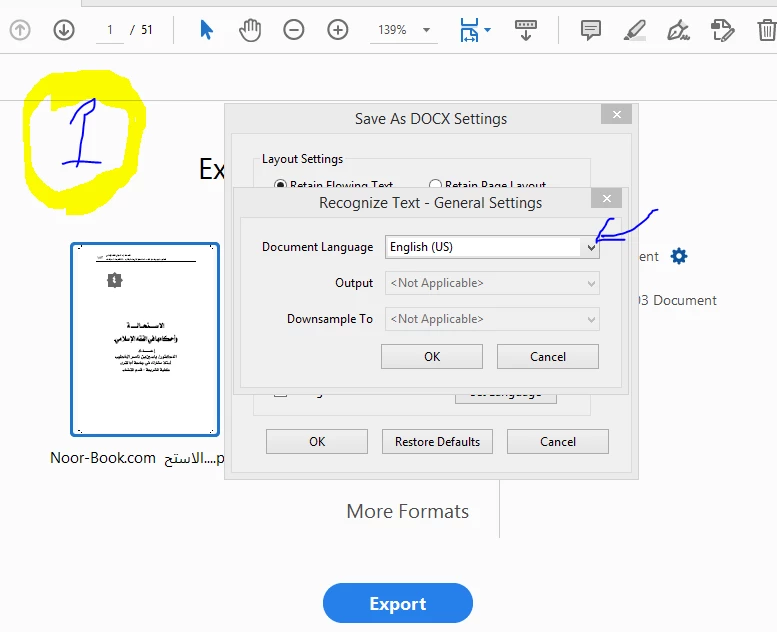
After completing the steps, I downloaded Acrobat Reader Pro from Creative Cloud. This is in order to download the program with the support of the Arabic language. But when I wanted to convert a pdf file to a doc file, I did not find Arabic language support in the list, as in Picture No. (1)?
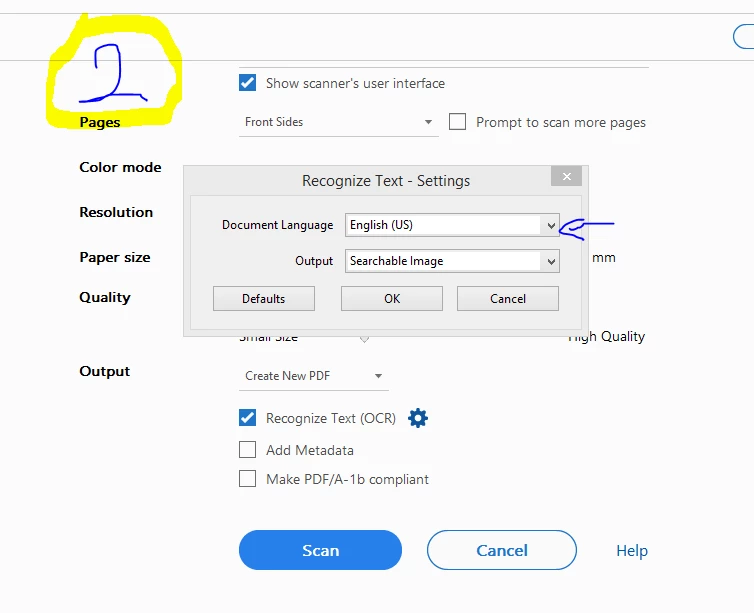
Also, in the conversion method by scanning "OCR", I did not find Arabic language support in the list, as in Picture No. (2)?
Please explain to me why? with an explanation of the solution?

من فضلك اشرح لي لماذا؟ مع شرح الحل؟
Correct answer Zaid Al Hilali

Dear Abdul-Sahib

Whether you download Acrobat Pro with Arabic Support or without, certain features in Acrobat will support Arabic regardless of your language choice when installing Acrobat.

Both features you asked for (OCR & saving a PDF to MS. Word) doesn't support Arabic as yet.

The Arabic OCR feature in Acrobat is hopeless, and we have no workaround, however, saving PDF to Word document can be done in another way as explained below…

If you are on a Windows machine, launch Microsoft Word, then open the PDF straight inside Word as such Microsoft Word will convert the PDF with its Arabic content, as such you will get a much better result than using Acrobat for the conversion.

You may vote on this feature request for the Arabic OCR

You may also vote on this feature request for the PDF to Word conversion.

2 replies

Zaid Al Hilali
Community Expert
Zaid Al HilaliCommunity ExpertCorrect answer
Community Expert
November 29, 2022

Dear Abdul-Sahib

Whether you download Acrobat Pro with Arabic Support or without, certain features in Acrobat will support Arabic regardless of your language choice when installing Acrobat.

Both features you asked for (OCR & saving a PDF to MS. Word) doesn't support Arabic as yet.

The Arabic OCR feature in Acrobat is hopeless, and we have no workaround, however, saving PDF to Word document can be done in another way as explained below…

If you are on a Windows machine, launch Microsoft Word, then open the PDF straight inside Word as such Microsoft Word will convert the PDF with its Arabic content, as such you will get a much better result than using Acrobat for the conversion.

You may vote on this feature request for the Arabic OCR

You may also vote on this feature request for the PDF to Word conversion.

abdul sahibm79488992
Participating Frequently
January 6, 2023

Hello, I was wondering that adobe invented the pdf format, so it is assumed that if we have a pdf file with copyable text, that is, its pages are not images. and we converted it to a doc file using adobe Reader, so there will be no error rate in the text if the text is plain and not decorated.


Allow me to formulate the question clearly, and I hope you will answer it accurately and reliably:
▪Since Adobe Reader supports converting english-language pdf files to doc. And we assumed that we have a pdf file in english with text that can be copied and that the text is not decorated, which means that the pages of the book are not scanned and we will not use (OCR) technology. So, when converting this file to doc format using adobe reader, will there be an error rate in the text?


▪By the way, I have another question: I am thinking about the possibility of financing the Adobe Reader project in order to launch support for converting pdf files to doc in the Arabic language..so how to apply for funding this project to support this language?

Zaid Al Hilali
Community Expert
Community Expert
January 6, 2023

Your question about backward conversion, ie. PDF – Word.

In my opinion, as a long user of PDF format, the answer is how the PDF handles text and other assets on the page or in the document which you're converting to PDF in the first place, and surely which application is doing the conversion ie. AutoCAD, Photoshop, InDesign, Microsoft Office… etc. Whether the user used Adobe technology in the conversion or another technology from Apple, Microsoft, Cannon and what have you. Moreover, we need to understand that PDF is a compression format, so when converting a Word document to PDF, certain internal file structures will be changed in the process to make the PDF as small as possible in file size. Then we have many font issues to address.

All the above in making any PDF will affect later the backward conversion process. So even though Adobe is improving backward conversion with any new version so that we have now some above 85% (this figure is from me) of success rate with English or Latin content, on the other hand we have less than 15% (this figure is from me) of success rate for a PDF with Arabic content. 

I'm not going to defend Adobe at all in this matter. As you said, Adobe created the PDF and they developed Acrobat, they support Arabic in many ways, but are dragging their feet when it comes to these few - high in demand - options. I personally have passed our requests to Arab Adobe personnel in order to share it with the concerned team.


What surprises me is that when the Middle Eastern version of Acrobat and few other Adobe applications used to be localized/Arabized by a French company named Winsoft, we used to have better Arabic support in Acrobat as far as I remember. So I believe our requests aren't that hard to be met.


I have no comment on your suggestion to fund the Acrobat team to consider fixing the above-discussed bugs and shortcoming.

Krutikka D
Community Manager
Community Manager
November 28, 2022

Hello @abdul sahibm79488992 


I  hope you're doing great, and sorry for the trouble.


Adobe ExportPDF supports the following languages:

English (US)

English (UK)

German

Spanish

French

Italian

Japanese

** Export pdf does not support the Arabic language.

However, you can submit a feature request here -  Feature Request/Bug Report Form.

I hope it helps.

Regards,
Krutikka