Participant
June 7, 2021
Answered

Customize the right panel of tools in reader (cFavorites entries) and other key to unfreeze ?

  • June 7, 2021
  • 1 reply
  • 924 views

Hello,

I tried to find the registry keys to change the tools menu (at the right, when you open a document).

With registry, it seems possible with acrobat pro but when I try to do the same things with the reader HKEY_CURRENT_USER \ Software \ Adobe \ Acrobat reader \ DC \ AcroApp \ cFavorites will there be a key that would block the possible customizations for the reader?

Have you got an idea ?

Regards,

This topic is closed to new replies. Start a new post to keep the conversation going.
Correct answer Amal.

Hi there


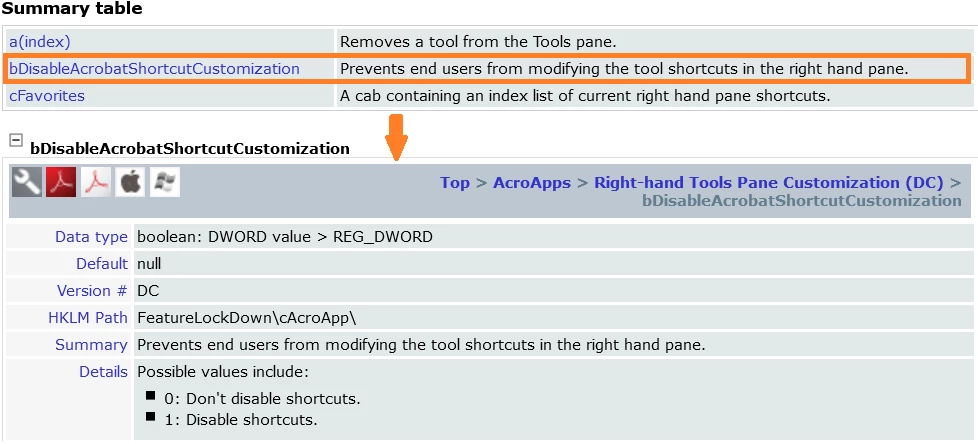
Hope you are doing well and sorry for the trouble. As described, you want to block the right hand tool pane customization in Adobe Acrobat Reader DC


Please check the registry settings shared below and see if that works for you.


Hope it will help


Regards

Amal

1 reply

Amal.
Amal.Correct answer
Legend
June 8, 2021

Hi there


Hope you are doing well and sorry for the trouble. As described, you want to block the right hand tool pane customization in Adobe Acrobat Reader DC


Please check the registry settings shared below and see if that works for you.


Hope it will help


Regards

Amal