

DC fill feature not recognising non english inputs
Hello,
I have the latest Adobe Reader DC on my Win10 laptop. And really excited about the new Fill & Sign feature. Especially the Combo Text field option, especially good for keying in Phone nos, ZIP etc. Too cool, thanks.
Please provide additional Text format options - Bold, Italic, Underscore, Sub/Super script ....
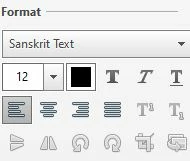
Using the "Fill" feature, I want to fill it in an Indic language. I used a familiar IME called Azhagi+, in the "hooked" mode, Indic characters/fonts are not getting filled. However, when I exit the "hooked" mode, I am able to fill in English.
Perhaps, an option should be given to "Choose" a specific "Font" to solve this?
This feature worked a few weeks back, but with the latest DC update (updated on 25Sep20, ) this is not working. I think the older version had the option to select a Font, so when I select Sanskrit Text, it used to get typed in Skt.
Also, this fill-in-hooked-mode is working fine in the free PDF-Xchange reader.


 AdChoices