
Answered
dict-object
Dear reader,
I can't sign my pdf documents anymore, error message in the pic below.
This problem occurred after the last update, please advise.
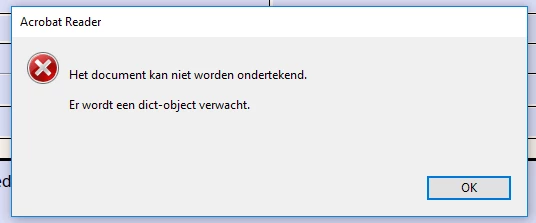

Dear reader,
I can't sign my pdf documents anymore, error message in the pic below.
This problem occurred after the last update, please advise.
Hello Sjefv,
We apologize for the inconvenience caused, as per the description above, you are not able to sign a PDF file, Is that correct?
Would you mind sharing the exact error message which you get (mentioned in the screenshot)?
Try signing the PDF file from the URL https://cloud.acrobat.com/fillsign using a browser and see if the issue is reproducible. Have you tried with other PDF file or is it with one specific PDF file?
Are you using Adobe Fill&Sign feature or trying to sign the PDF using Adobe Certificate Base signatures?
Make sure that you have the latest version of Adobe Reader installed, check for any pending updates of Adobe Reader from help>check for updates, reboot the machine if you install any updates.
Also, check the document Properties once and see if the Signing is allowed for the PDF file, navigate to File>Properties in Adobe Reader, Select Security Tab>Is signing is allowed?
Let us know how it goes and share your findings.
Regards,
Anand Sri.
Already have an account? Login
Enter your E-mail address. We'll send you an e-mail with instructions to reset your password.


 AdChoices