Participant
April 15, 2021
Question

Disable automatic update Acrobat Reader DC

  • April 15, 2021
  • 1 reply
  • 2146 views

Hi,

I'm an IT technician that would try to disable the automatic update of Acrobat Reader DC due to a problem with SAP's preview/print.

I've read some post in this forum and using the Adobe Wizar I've build a new installation package with this "main" parameters.
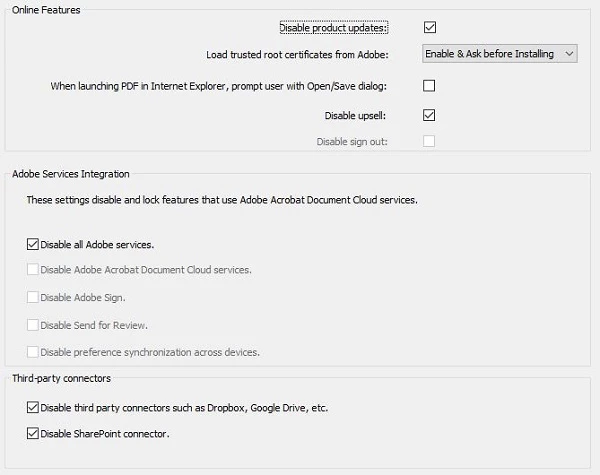

 

This solution didn't solve the problem because Acrobat Reader DC continues upgrating itself.

In the "task scheduler" I've found a task called "Adobe Acrobat update task" enabled. Is that the problem?

Could someone help me? Is it possible to find a wizard's guide more detailed that can help to understand how to solve the problem?


Thanks in advance for your collaboration.

(and sorry for my bad english)

Reguard

Luca

This topic has been closed for replies.

1 reply

Legend
April 15, 2021

So far as I know acrobat updating is not a "service". This is a reference to things like export PDF, which connect to Adobe to convert files. Did you read the Acrobat Enterprise Deployment guide?  You MIGHT have to set this on an initial deployment rather than later.

Participant
April 15, 2021

Hi,

I've read the deployment guide and under the paragraph "disabling updates", I've choose the choice "B", but didn't work and Acrobat Reader keep updating


Participating Frequently
April 16, 2021

What you disabled is "Web Services" installed with Reader.

#4 in your image says - "Disable updates to the web service plugins".

To disable updates for Reader itself, please set bUpdater to 0 directly under this Registry path below

HKLM\SOFTWARE\Policies\Adobe\(product name)\(version)\FeatureLockdown