
Participant
April 13, 2023
Answered

Disable(off) "Attach a Link" button permanently

  • April 13, 2023
  • 7 replies
  • 13347 views

Hi ,

Seems that after latest update the Disable "Attach a Link" turn on agian after closing acrobat reader while before once it was off it was off even when closing and opening the acrobat reader once agian , basicly now the user needs another click to send the attachment ... anyone got a solution for this issue? is there away to set the button off permanently ? 


Thanks,

David.
This topic has been closed for replies.
Correct answer Meenakshi_Negi

Hi  Dudu29382261cf9p and Austin29396234i7sk,


Thank you for your patience so far.


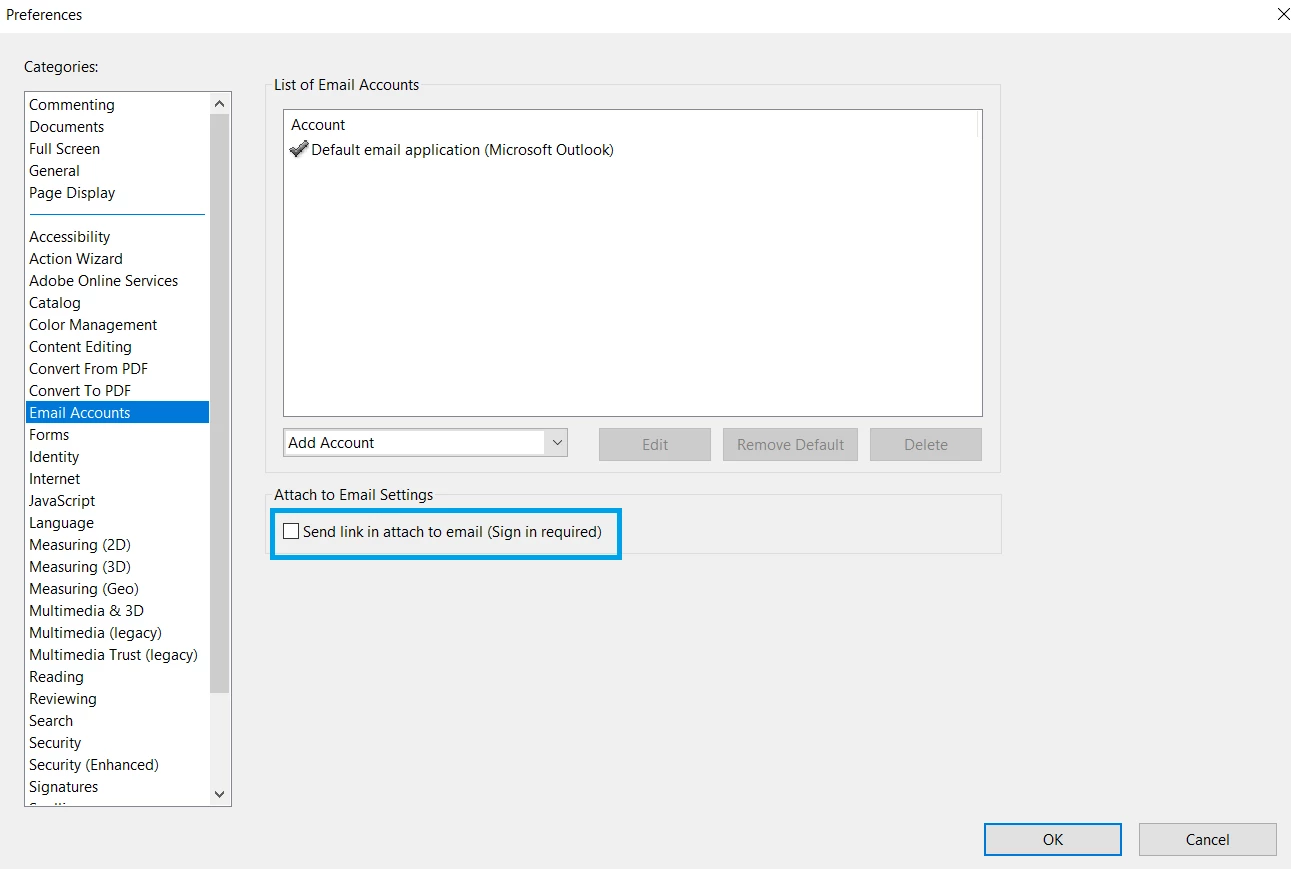
To send the PDF as an email attachment, disable the "Send link in attach to email (Sign-in required)" option in Acrobat Preferences.

Go to Edit > Preferences >  Email accounts on a Windows machine in Acrobat or Acrobat Reader. For Mac, Application Preferences > Email accounts.

Refer to the screenshot attached below:


Thanks,

Meenakshi


Marking a reply or response “Correct” will help future users with the same issue quickly identify the correct answer.


7 replies

Participant
November 22, 2023

Absolutely agree!  This is ridiculous having to reset preferences every time Adobe opens.  This isn't the 1970's.   When is the fix coming?????

Participant
August 23, 2023

None of the suggestions worked for me, so I called the customer service number.  The gentleman showed me how I could go back to the classic view that we all know and love.  

Go to MENU (3 lines at tope left)

In dropdown menu midway down Click on DISABLE NEW ACROBAT

It will tell you you need to restart Acrobat - Click Restart

And BOOM...you have the old view with the envelope to send attachements as .pdf and not that link that is driving everyone crazy!!!!!  

Hope this helps!!!!!

Participant
November 10, 2023

I jsut tried this and it still isn't working.  Ugh!

Meenakshi_Negi
Meenakshi_NegiCorrect answer
Legend
April 17, 2023

Hi  Dudu29382261cf9p and Austin29396234i7sk,


Thank you for your patience so far.


To send the PDF as an email attachment, disable the "Send link in attach to email (Sign-in required)" option in Acrobat Preferences.

Go to Edit > Preferences >  Email accounts on a Windows machine in Acrobat or Acrobat Reader. For Mac, Application Preferences > Email accounts.

Refer to the screenshot attached below:


Thanks,

Meenakshi


Marking a reply or response “Correct” will help future users with the same issue quickly identify the correct answer.


Participant
April 17, 2023

Correct, looks like this worked for me.


Thank you

Meenakshi_Negi
Legend
April 17, 2023

You are welcome!

Let us know if we can be of any help.


Thanks,

Meenakshi

Meenakshi_Negi
Legend
April 14, 2023

Hi Dudu29382261cf9p and Austin29396234i7sk,


Thank you for reporting this, and sorry for the inconvenience caused.

We have contacted the Engineering team for more information and will get back to you soon.
We appreciate your patience on this.


Thanks,

Meenakshi

Participant
April 14, 2023

Thank you, please let me know.

Meenakshi_Negi
Legend
April 14, 2023

Sure! You are welcome.


Thanks,

Meenakshi

Participant
April 13, 2023

I'm also having this problem as well as 3 other of my users.  Any fix from Adobe would great.

Participant
April 14, 2023

Same issue here.  A fix would be most helpful. Thanks

Meenakshi_Negi
Legend
April 13, 2023

Hi Dudu29382261cf9p,


Thank you for reaching out and reporting this.


Would you mind sharing the screen recording of the workflow?

Please share the Acrobat Reader and OS version on the machine.


Thanks,

Meenakshi

JR Boulay
Community Expert
Community Expert
April 13, 2023

[MOVED TO THE ACROBAT READER DISCUSSIONS]

Acrobate du PDF, InDesigner et Photoshopographe