
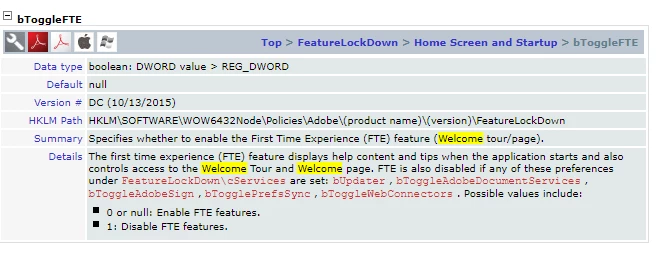
Disable the "Welcome to Acrobat Reader" "Start Tour" on first launch
Hi All,
I have deployed Adobe Acrobat Reader DC via GPO into a Windows 10 AD environment using the enterprise installer and configured with the Acrobat Customization Wizard DC. The installed verison is 2023.003.20215.
My requirement is simple. When a domain user opens Reader for the first time, I want Acrobat Reader DC to open and display the PDF file that the user is trying to open, without showing any other welcome screens or asking any questions or doing anything other than showing that PDF file.
What I have tried:
- In the customization wizard, I set as many options as I could find to disable such prompts and I disabled all Adobe online services.
- Set these registry keys via GPO:
[HKEY_CURRENT_USER\Software\Adobe\Acrobat Reader\DC\HomeWelcomeFirstMileReader]
"iFirstMileStage"=dword:00000001
"bHasShownReaderAppCard"=dword:00000001
"bHasShownScanAppCard"=dword:00000001
"bScanAppUsed"=dword:00000001
"bFirstMileMinimized"=dword:00000001[HKEY_LOCAL_MACHINE\Software\Policies\Adobe\Acrobat Reader\DC\FeatureLockDown\cWelcomeScreen]
"bShowWelcomeScreen"=dword:00000000[HKEY_CURRENT_USER\Software\Adobe\Adobe Acrobat\DC\UsageMeasurement]
"bInstalledCleanupCheckDone"=dword:00000001
"bHighbeamNoticeShown"=dword:00000001[HKEY_CURRENT_USER\Software\Adobe\Adobe Acrobat\DC\FTEDialog]
"iFTEVersion"=dword:0000000a
"bWelcomeCard_AcroUpdate"=dword:00000001
"bHighBeamCard"=dword:00000001[HKEY_LOCAL_MACHINE\SOFTWARE\WOW6432Node\Adobe\Acrobat Reader\DC\Installer]
"ENABLE_CHROMEEXT"=dword:00000000 - Installed the group policy template AcrobatReaderDC.admx and set:
Show messages when I launch Reader to Disabled
Don't show messages while viewing a document to Enabled
Turn off user participation in the feedback program to Disabled
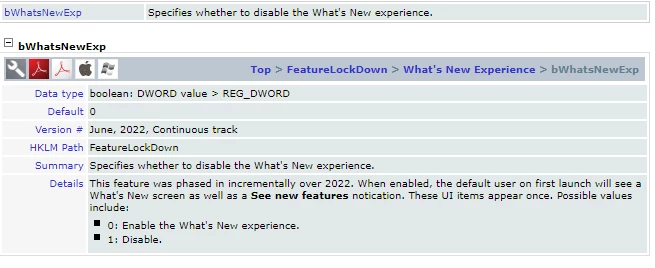
Despite doing all of the above, the "Welcome to Acrobat Reader" screen is displayed with the blue button that says "Start Tour" upon first launch for each domain user. How can I stop this behaviour?

 AdChoices