
March 17, 2020
Answered

Disable updates with Customization Wizard but still schedulded task

  • March 17, 2020
  • 1 reply
  • 2814 views

We install the Acrobat Reader 2017 Classic with SCCM.

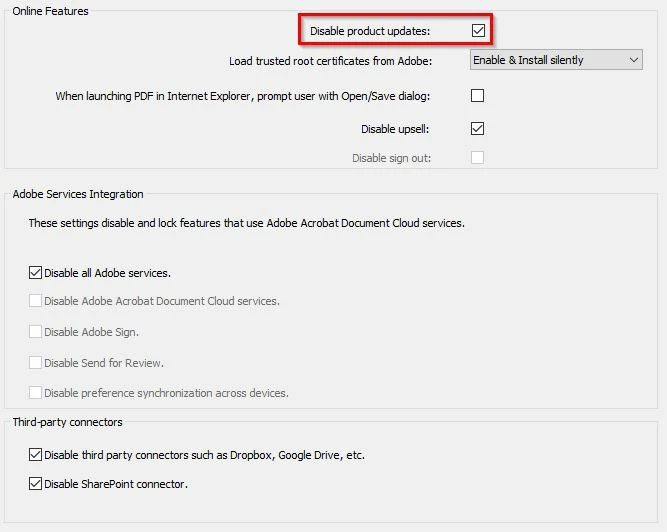
With the Customization we disabled alle updates.
 

I know about the schedulded task and the update service.

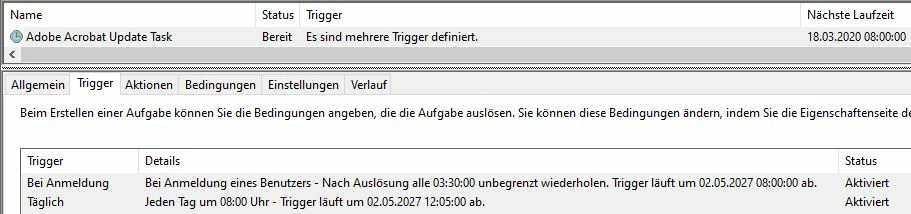
But i don't understand why the task runs every day?!
 

There are no other Adobe products installed.

Flash will be updated through Windows updates.


It is not necessary to run the update task every day multiple times if updates are disabled!

In our environment we delete the schedulded task and disable the service.

But with the next update everything is back again.


Please Adobe let us disable this once and don't change this after an update!

Thanks!


This topic has been closed for replies.
Correct answer LeoUpdaterX

When Updater is launched by the Task, it checks all supported products and, if they are all disabled, Updater exits.

This takes a second and no system resources.

The Service is not used if Updates are disabled, and uses almost no resources as well.

It is complicated what you are asking about. The only way is not to install Updater with initial customized installation by making manual changes in the Direct View editor in the Customization Wizard. If you change your mind later and for example decide to enable updates for Reader, but leave dsabled for Services, you would need to completely remove product and install again with defult Updater install state.

1 reply

LeoUpdaterXCorrect answer
Participating Frequently
March 17, 2020

When Updater is launched by the Task, it checks all supported products and, if they are all disabled, Updater exits.

This takes a second and no system resources.

The Service is not used if Updates are disabled, and uses almost no resources as well.

It is complicated what you are asking about. The only way is not to install Updater with initial customized installation by making manual changes in the Direct View editor in the Customization Wizard. If you change your mind later and for example decide to enable updates for Reader, but leave dsabled for Services, you would need to completely remove product and install again with defult Updater install state.

March 18, 2020

Thanks for the reply. I unterstand the mechanism now.