
chrism012470
Participant
May 16, 2019
Question

Disabling E-Mail Pop Up Window in Acrobat Reader Version 19.012.20034

  • May 16, 2019
  • 1 reply
  • 2721 views

Hello,

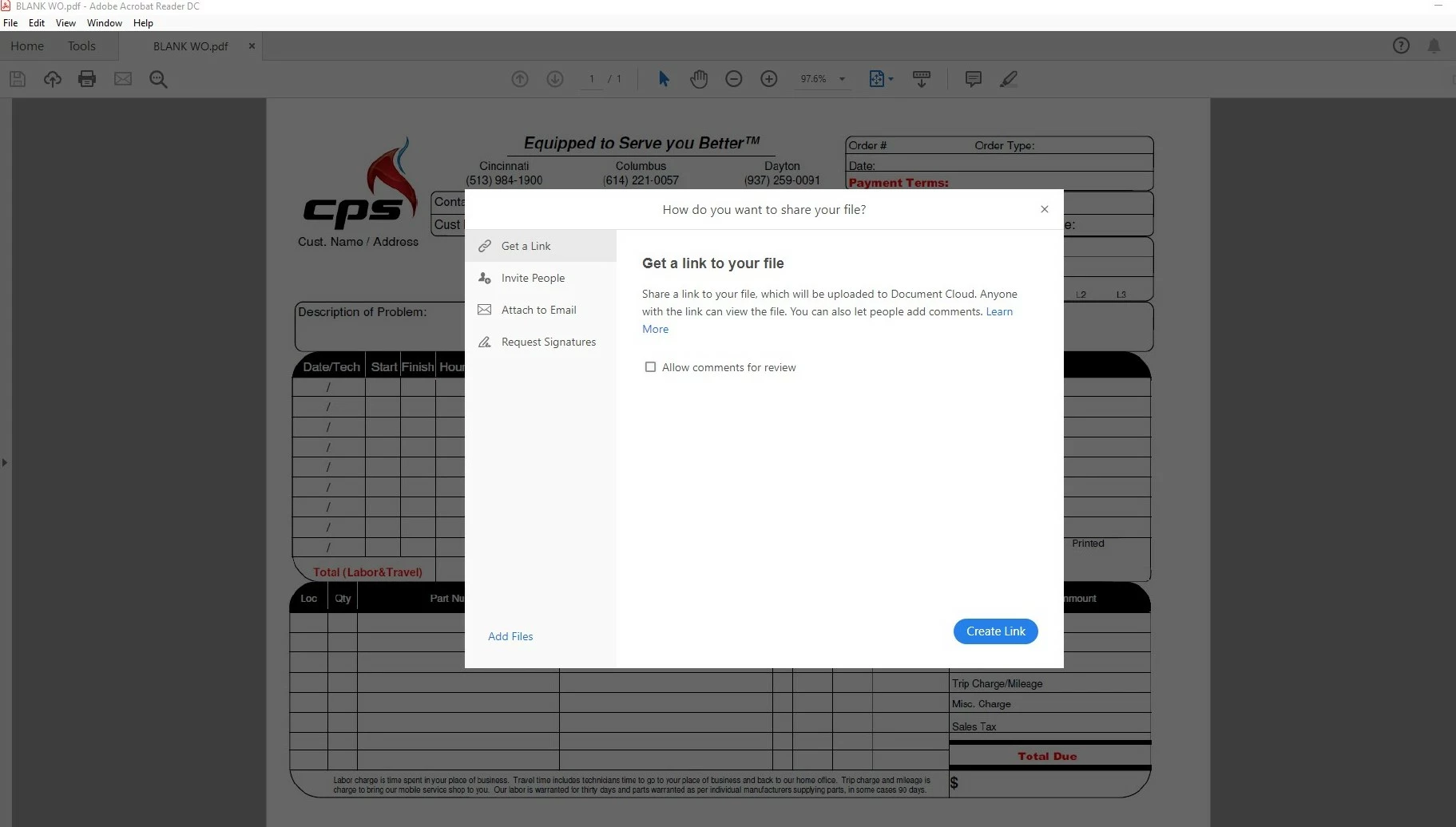
After Acrobat Reader DC update 19.012.20034, a new pop up window shows up when using the direct e-mail icon.

It covers the view of the document I am trying to e-mail, blocking much of the information I might want to include in the subject line.

Can this be disabled or at least set to default to "add as attachment?"

Prior to the update, an Outlook window was automatically generated with the document already attached and that worked perfectly.

See below:
    This topic has been closed for replies.

    1 reply

    AnandSri
    Community Manager
    Community Manager
    May 16, 2019

    Hello Chrism,

    Fill and Sign and Adobe Sign (formerly known as Send for Signature) are now consolidated into a single Sign tool where you can either fill & sign a document or get a document signed from others. It includes a simplified experience that asks you who needs to fill and sign first: you or others and then walks you through the steps to complete the task. It's the one place for all your form filling and signature needs. For detailed information, you may refer to the article What's new in Adobe Acrobat DC

    You may try the registry fix shared in the help article How to use the email icon to directly send file as attachment

    Let us know if that works for you.

    Thanks,

    Anand Sri.

    chrism012470
    Participant
    May 16, 2019

    Thank you Anand, however the fix would not work for me.

    I closed all associated apps and I have full administrator privileges, but when attempting to “merge”, I get the following error dialogue box…

      Should I try closing all programs first?

    AnandSri
    Community Manager
    Community Manager
    May 16, 2019

    Close all the Adobe apps, then reboot the machine and try again. Let me know if you experience any issue.

    Thanks,

    Anand Sri.