Participating Frequently
July 4, 2018
Answered

Disappeared toolbar text and dialog boxes text and crashing preferences

  • July 4, 2018
  • 3 replies
  • 3059 views

Hi,

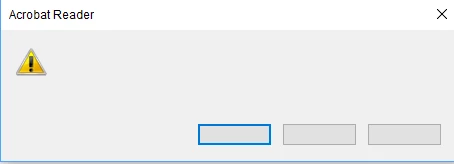
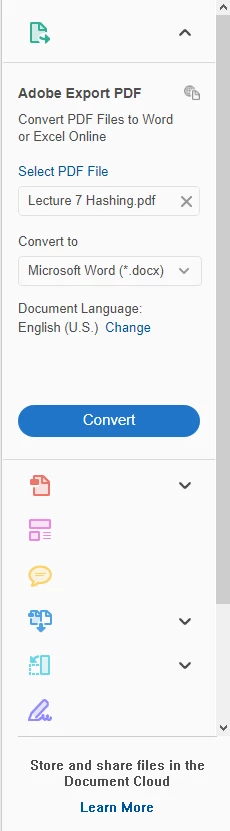
I have this problem only on my desktop where texts from my dialog box and toolbar are missing. When i tried to troubleshoot by opening the preference option under edit my adobe also crashes without any error message. Below are 2 images that shows this bug. I tried downloading the cleaner which removes all related adobe files as well as downloading a new adobe reader program from the official website but this problem still persist. Therefore, i hope to find a solution to this problem as i do need this urgently to study for my upcoming test and exams. Hope anyone have a workable solution for this problem.

Regards.

P.S : I have tried the following solution that is already in the forum but however the problem is still not solved.

1. I tried downloading the cleaner, run it and when it's cleaning the reader half way, the cleaner just hangs and refuses to complete the task even though the reader is actually deleted so i assumed they did not fully clean out the registry that contains the adobe reader.

2. I tried checking for update and i am already using the latest adobe reader DC.

3. I tried repairing the problem via control panel and the app itself.

4. I tried changing the compatibility of the problem to windows 7/8.

5. I tried running as administrator.
Correct answer mikelaking

The solution to this problem is - delete the DC folder in C:\Users\%USER%\AppData\Local\Adobe\Acrobat.
It worked for me.

source:

Adobe Reader DC 2019.012.20034 - keeps crashing an... - Adobe Community - 10559665

3 replies

mikelakingCorrect answer
Participant
March 26, 2025

The solution to this problem is - delete the DC folder in C:\Users\%USER%\AppData\Local\Adobe\Acrobat.
It worked for me.

source:

Adobe Reader DC 2019.012.20034 - keeps crashing an... - Adobe Community - 10559665

S_S
Community Manager
Community Manager
April 25, 2025

Hi @mikelaking,


Hope you are doing well. 


Thanks for sharing what worked for you.

Marking this as a correct answer for future users to use as a reference.


Regards,
Souvik.

Participating Frequently
August 24, 2018

Are you sure your telephone is enabled to call overseas? I'm from Singapore and +65 is my country code while the number is my personal number. Please ensure that you have entered the country code together with my number together. I do not have any number as this is the only way for telephone contact.

AnandSri
Community Manager
Community Manager
August 29, 2018

Hi Bryan,

I have sent you an email with the details of meeting id and remote session, please check your email inbox.

Thanks,

Anand Sri.

AnandSri
Community Manager
Community Manager
July 4, 2018

Hello Angelicblues,

We're sorry for the trouble you had with Adobe Reader and thank you for trying all the troubleshooting steps.

As you mentioned that you tried removing Adobe Reader using the Acrobat cleaner tool but the cleaner tools freeze in the middle.

Please install all the latest updates of the operating system and reboot the machine once. Then if you are able to launch the Adobe Reader, then navigate to Edit>Preferences>Security(enhanced)>uncheck 'Enable Enhanced Security'. Reboot the machine and check.

Try removing Adobe Reader again using the Acrobat cleaner tool and reboot the machine https://labs.adobe.com/downloads/acrobatcleaner.html and if the setup still freezes, then create a test user profile with full admin rights and check with Adobe Reader.

What is the version of operating system installed? Is any security software installed and what is the version?

Let us know how it goes and share your findings.

Regards,

Anand Sri.

Participating Frequently
July 4, 2018

I have already checked that i have installed all the latest and necessary update for windows 10 and rebooted my computer.

Initially when i had my adobe reader installed, i tried to do the following "Edit > Preferences" step. Unfortunately, when i selected the preference option, the entire adobe reader just hang and it crashes without any error message.

Therefore, i tried using the cleaner tool on my current profile and as usual it hanged. I then went to create a test profile to run the same cleaner but it already said the reader has been removed. So i attempted to install the latest adobe reader into the test profile and the problem still persist on both my test profile and main profile.

Currently, i'm using Version 1803 (OS Build 17134.137) by Windows 10 and i do not have any security software installed as i'm only using the provided windows defender.

AnandSri
Community Manager
Community Manager
July 5, 2018

Hello Angelicblues,

We're sorry for the trouble, I have sent you a private message, please check your email inbox.

Thanks,

Anand Sri.