
khammedg57288183
Participant
November 17, 2017
Question

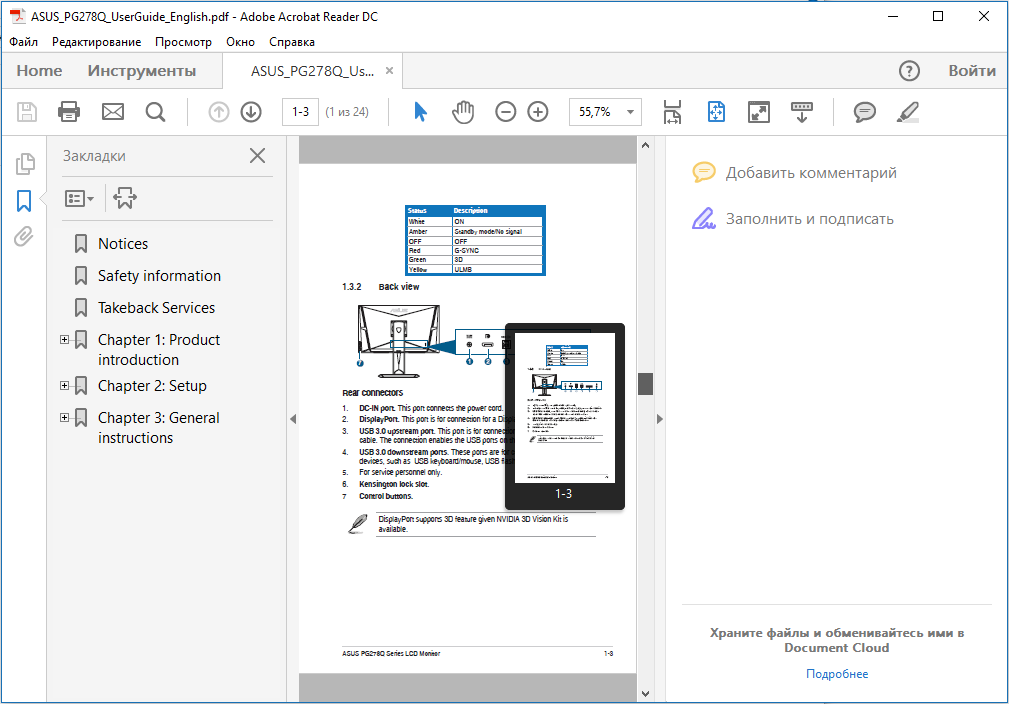
Displaying a thumbnail of the page being viewed / Отображение миниатюрной окны просматриваемой страницы

  • November 17, 2017
  • 1 reply
  • 672 views

How do I enable the display of a thumbnail of the page being viewed? / Как включить отображение миниатюрной окны просматриваемой страницы?

As in this image / как на этом изображенииAdobe_reader2.png
This topic has been closed for replies.

1 reply

AkanchhaS8194121
Legend
November 17, 2017

Hi Khammedg,

If I understand your query correctly, you would like to enable the thumbnail of the page open currently so that you can navigate it easily.

You may refer to the help document to understand clearly- Page thumbnails and bookmarks in PDFs, Adobe Acrobat 

Hope this help.

Regards,

Akanchha

khammedg57288183
Participant
November 17, 2017

Hi,

No, you misunderstood me. I want to display a thumbnail window that shows the active page with the visible area. In the image he circled in red.

With this window it's easy to scale - you move the mouse to this window and change the scale of the page with the wheel.

Bernd Alheit
Community Expert
Community Expert
November 17, 2017

"Pan & Zoom" or "Loupe Tool" ?