
Participant
November 7, 2019
Answered

Document info panel

  • November 7, 2019
  • 2 replies
  • 827 views

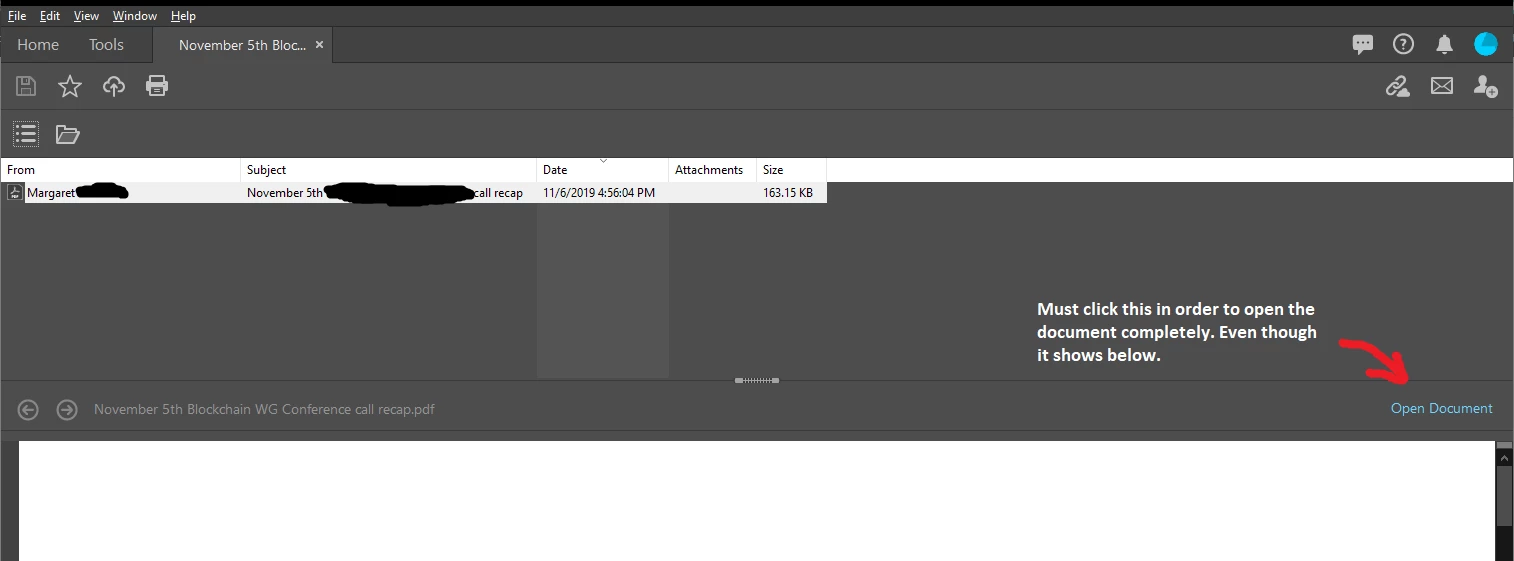
When I open some PDFs, on my current and last machine, in Acrobat DC, it opens below a file list which only contains the one file. Then there is a link that says, "Open Document," that you have to click to open the document fully (to use tools, etc.). I can't find any info on this panel and I don't want to use it. It causes you to open two tabs per document. I am enclosing an image since I cannot find any info on this panel, not even in Adobe documentation.


First thing that opens:
 

This topic has been closed for replies.
Correct answer paulk57185454

FYI: I just figured out that you can go into preferences on the Acrobat menu in Outlook and turn off, "Output Adobe PDF Portfolio when creating a new PDF". This is the actual solution to the issue as there will be no portfolio attached to the document.

2 replies

paulk57185454AuthorCorrect answer
Participant
November 7, 2019

FYI: I just figured out that you can go into preferences on the Acrobat menu in Outlook and turn off, "Output Adobe PDF Portfolio when creating a new PDF". This is the actual solution to the issue as there will be no portfolio attached to the document.

Bernd Alheit
Community Expert
Community Expert
November 7, 2019

It is a portfolio with one document.

Participant
November 7, 2019

Thanks, Bernd.

This was a simple "save as PDF" from Outlook, how did it become a portfolio? Is there a way to simply open it as a document instead?

Bernd Alheit
Community Expert
Community Expert
November 7, 2019

Converting mails from Outlook will always create portfolios.