Participant
June 29, 2021
Answered

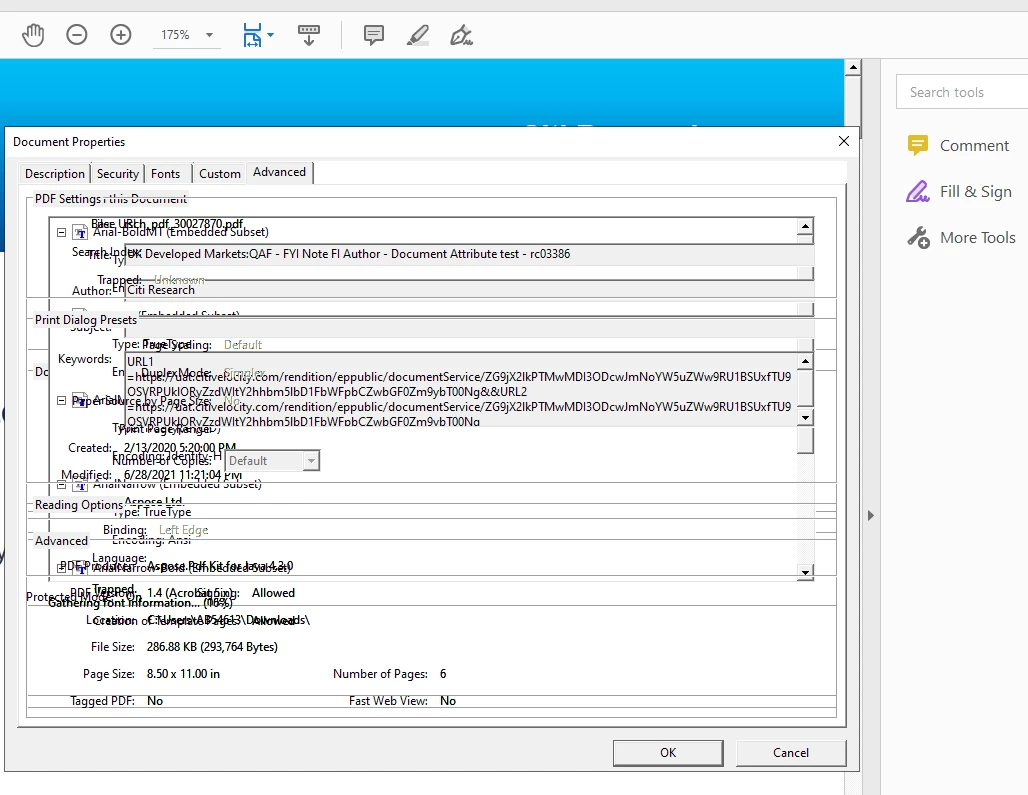
Document Properties text gets distorted

  • June 29, 2021
  • 1 reply
  • 576 views

The texts in the documnet properties dialog box starts getting distorted when I start switching to different tabs in the same dialog box (ex: Description, Security, Custom etc)


Using Continuous Version: 21.001.20155


Have attached a  sample for better understanding for the issue,


Please let me know the cause and a possible solution to resolve this.


Thanks

This topic has been closed for replies.
Correct answer AkanchhaS8194121

Hey!

Thanks for sharing the screenshot. 

Looking at it, it seems that document properties dialog doesn't display all the Tabs correctly as it should be and we assume you have freeware Acrobat Reader DC running on Windows. Also, your application version seems to be not up-to-date. [https://www.adobe.com/devnet-docs/acrobatetk/tools/ReleaseNotesDC/index.html]

Try these steps to see if that helps:

1- Open a different PDF and check its property's Tabs.

2- If it has the same behavior then, close the application and Reboot computer. 

3-Open Acrobat Reader>helps>check for update.Move to next step if its not working yet. 

4- Navigate to Reader>Edit>Preferences>Security (Enhanced)>disable "Protected Mode at Startup" and "Enhanced Security">OK>Reboot Reader 

4- If it still doesn't work, then run this cleaner tool for the removal of the application and its traces: http://labs.adobe.com/downloads/acrobatcleaner.html  

and reinstall it: https://helpx.adobe.com/acrobat/kb/install-reader-dc-windows.html 


Thanks,

Akanchha 

1 reply

AkanchhaS8194121
AkanchhaS8194121Correct answer
Legend
June 29, 2021

Hey!

Thanks for sharing the screenshot. 

Looking at it, it seems that document properties dialog doesn't display all the Tabs correctly as it should be and we assume you have freeware Acrobat Reader DC running on Windows. Also, your application version seems to be not up-to-date. [https://www.adobe.com/devnet-docs/acrobatetk/tools/ReleaseNotesDC/index.html]

Try these steps to see if that helps:

1- Open a different PDF and check its property's Tabs.

2- If it has the same behavior then, close the application and Reboot computer. 

3-Open Acrobat Reader>helps>check for update.Move to next step if its not working yet. 

4- Navigate to Reader>Edit>Preferences>Security (Enhanced)>disable "Protected Mode at Startup" and "Enhanced Security">OK>Reboot Reader 

4- If it still doesn't work, then run this cleaner tool for the removal of the application and its traces: http://labs.adobe.com/downloads/acrobatcleaner.html  

and reinstall it: https://helpx.adobe.com/acrobat/kb/install-reader-dc-windows.html 


Thanks,

Akanchha 

Participant
June 30, 2021

Hi Akanchha,

Thank you for the quick reply. 

Regarding step 1, this does not happen always. The distortion is seen occasionaly with different PDFs as well.

I tried the step 4, and I have checked the properties tab for over 15 PDfs and the distortion is not being seen.  This seems to have solved the problem.


What could have been the cause for this issue and what changes does disabling "Protected Mode at Startup" and "Enhanced Security" do? 

Could you help me understand the above.


Thanks,

Ashwath