Known Participant
May 17, 2023
Question

document with A4 format paper printed by A5 Printer

  • May 17, 2023
  • 1 reply
  • 910 views

Sir, 

How can I limit A4 format pager printed by A5 printer always in A5 format? I found sometimes it will change from A5 to A4 when I print A4 document. Thanks a lot.

This topic has been closed for replies.

1 reply

AkanchhaS8194121
Legend
May 31, 2023

Hi @ektrontek 


Thanks for reaching out. We apologize for the delay in response to your question posted above.

You can set the pages themselves as A5 if your printer is capable of taking A4 paper and printing

them in A5. 


You might need to check the Printer's settings and preferences, as it should not reset after a couple of instances.

  • On the other hand, it could be a document-specific issue, where the file itself doesn't allow printing in A5 file format. 
  • You may also check if you have installed the Acrobat Reader's latest update. 
  • Go to Acrobat> Help > Check for updates and reboot the computer once (you must save all the work before restarting)

To download the patch manually, more information about this release is here: Release Notes | Adobe Acrobat, Reader


Thanks,

Akanchha

S_S
Community Manager
Community Manager
May 31, 2023

@ektrontek Adding to what Akanchha said,


You might want to tweak a few settings with your printer as well:


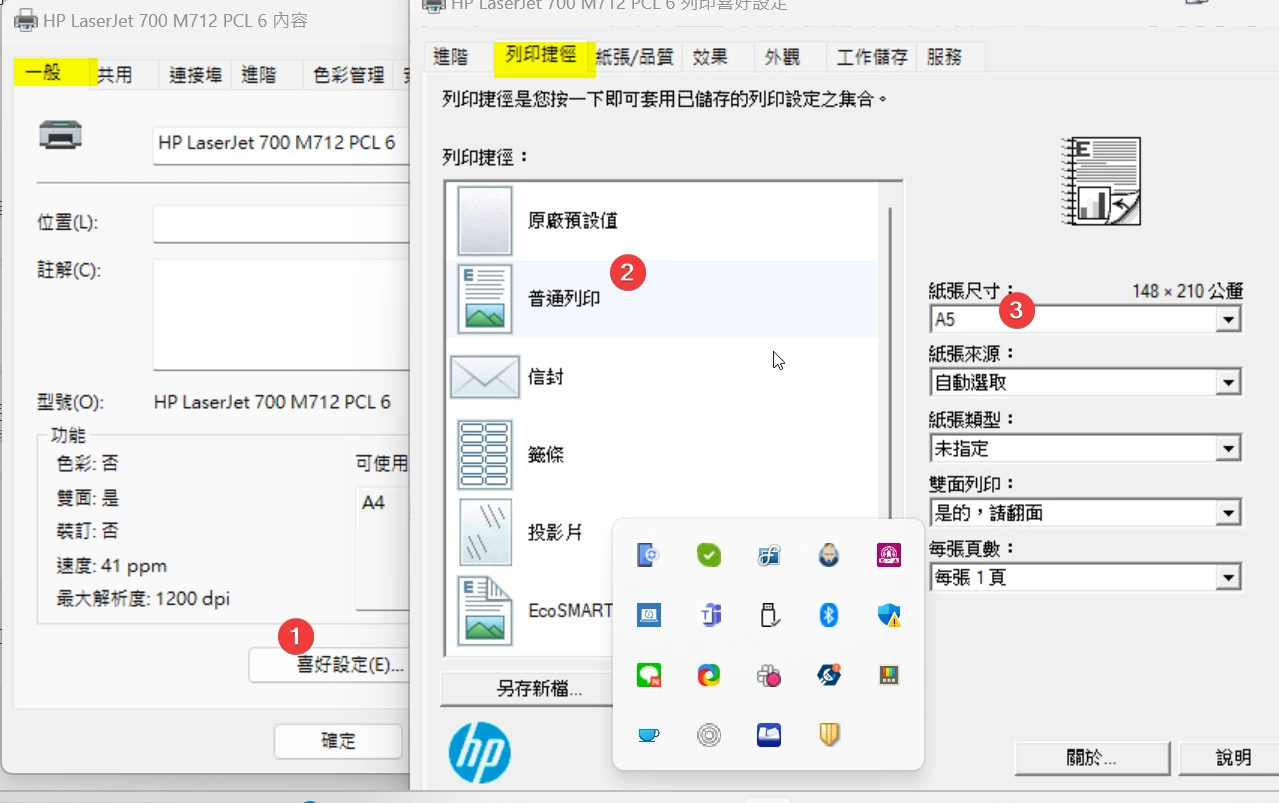
1. Click Start, point to Settings, and then Bluetooth & Devices-> click Printers & Scanners.

2. Click the appropriate printer, and then click Printing Preferences.

3. Then check the paper size you want to use in the Paper Size box.

4. Click OK, and then close the Printers folder.


Hope this works.


-Souvik