

Answered
Does Acrobat Reader DC have a feature to create new bookmarks?
I use my Lenovo ThinkPad tablet running Windows 10 at the gym on the treadmill and I would like to bookmark where I stopped reading. I see bookmarks in my document, but no way to create a new one.
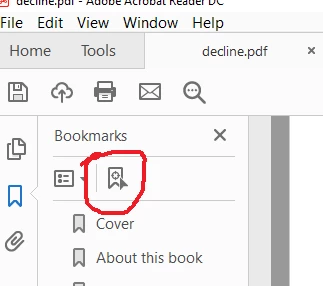
The bookmark looking icon circled in red is to find an existing bookmark, not create a new one. I'm using Adobe Acrobat Reader DC version 2019.010.20069. I would really like to be able to simply tap a bookmark that I previously created and continue reading where I left off. But maybe my version of Reader doesn't allow this.
Thanks in advance for any suggestions.
 AdChoices