Participant
December 10, 2021
Answered

Eliminate colors from predefined forms

  • December 10, 2021
  • 1 reply
  • 477 views

Hi, I was using the commentary tools. I used a square and a circle to remark a part of the document, but by mistake when I was looking for a color arround I selected a background color for the whole figure (covering what remains behind). i don't know how to eliminate this colors and keep only the frame. Can anybody help me?

This topic has been closed for replies.
Correct answer try67

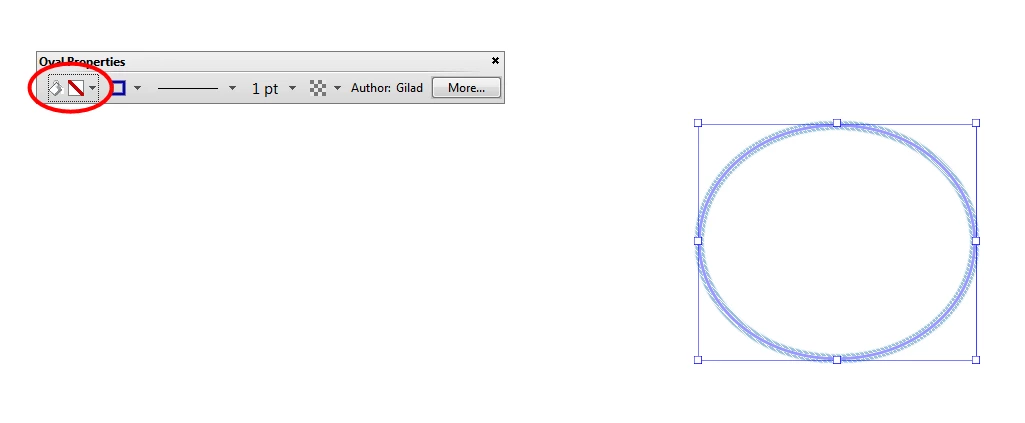
Select the comment(s), press Ctrl+E and change the first color in the floating toolbar that appears to No Color:


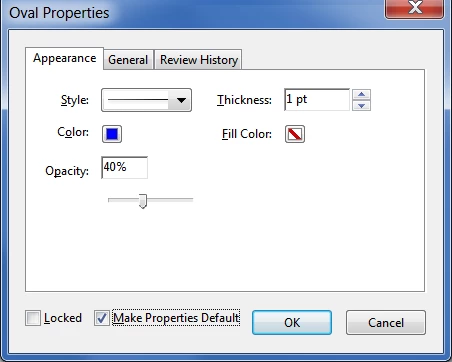
You can set it as the new default by clicking the More button in that same toolbar and then ticking the "Make Properties Default" check-box in that dialog:


1 reply

try67
Community Expert
try67Community ExpertCorrect answer
Community Expert
December 11, 2021

Select the comment(s), press Ctrl+E and change the first color in the floating toolbar that appears to No Color:


You can set it as the new default by clicking the More button in that same toolbar and then ticking the "Make Properties Default" check-box in that dialog: