
wolfgangn50067127
Participant
October 24, 2019
Answered

Email symbol (envelope) is missing

  • October 24, 2019
  • 1 reply
  • 4806 views

Dear Guys,

I missed the Email symbol (envelope) in my Adobe Reader DC. I must use the way over Share, Link....

Take a look on my attachment, please.
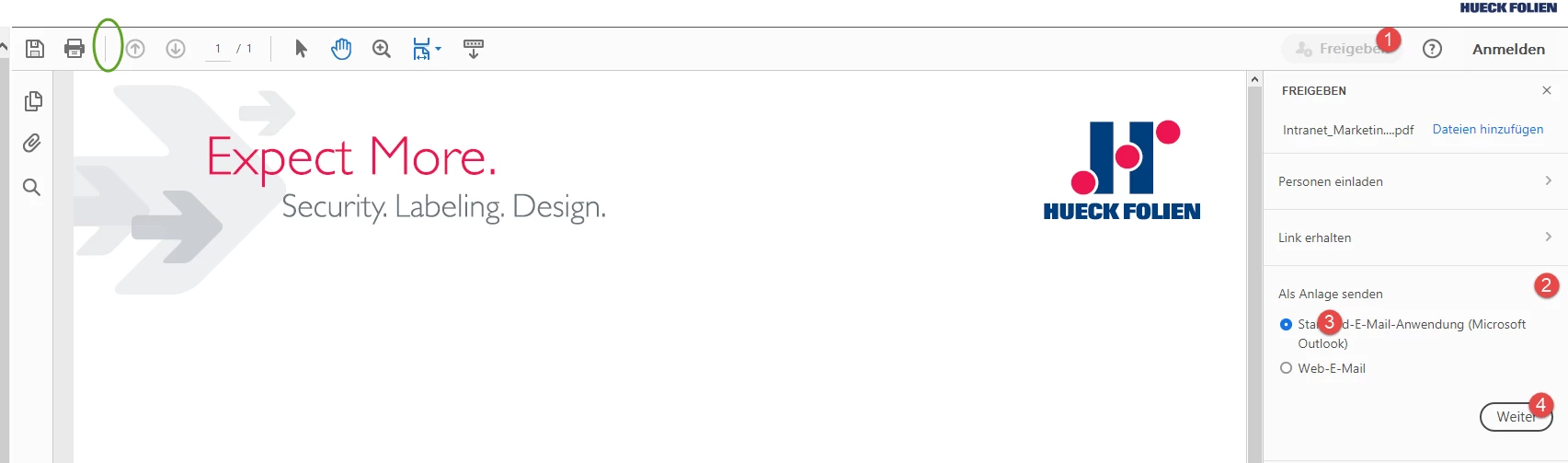
 

How can I do this over the email-shortcut?

Hope you can help me.


Thanks


cu

Wolfgang


    This topic has been closed for replies.
    Correct answer arvindy

    Hi wolfgangn50067127,

    Sure, will inform you.


    Regards,

    Arvind


    Hi

    Adobe Acrobat and Reader official update (19.021.20049) containing the fix for this issue is now available. This update will be automatically pushed to all existing installations of Acrobat and Reader. You may also manually trigger the update early by opening the application and going to Help > Check for Updates.

    More information about this release is here: https://helpx.adobe.com/acrobat/release-note/release-notes-acrobat-reader.html

    Please try it out and let us know your feedback!

    Thanks for your patience and support!


    Regards,

    Arvind

    1 reply

    Adobe Employee
    October 24, 2019

    Hi wolfgangn50067127,

    Apologies for the inconvenience caused!

    We are looking into it and let you know once we plan to deliver the fix. Meanwhile, you can use the keyboard short cut. ALT + FL to attach pdf directly if you are using SendMail in Acrobat/Reader app on a Windows machine. Please take a note that the short cut does not work in Internet Explorer. It works in Acrobat/Reader app on Windows systems.


    Regards,

    Arvind

    wolfgangn50067127
    Participant
    October 24, 2019

    Hi Arvind,

    thanks for your prompt answer 🙂

    Is it possible to inform me, if the fix or an update is available?


    Thx

    cu

    Wolfgang

    Adobe Employee
    October 24, 2019

    Hi wolfgangn50067127,

    Sure, will inform you.


    Regards,

    Arvind