Participant
August 8, 2017
Question

Erreur lors de la création du message

  • August 8, 2017
  • 2 replies
  • 1616 views

Bonjour,

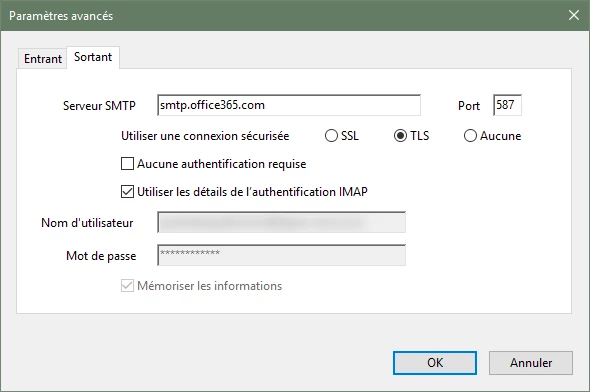
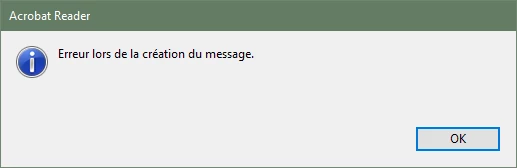
Impossible de créer et/ou envoyer un message avec Adobe Reader DC et Office365.
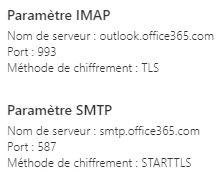
J'utilise les paramètres de Microsoft pour Office365 :
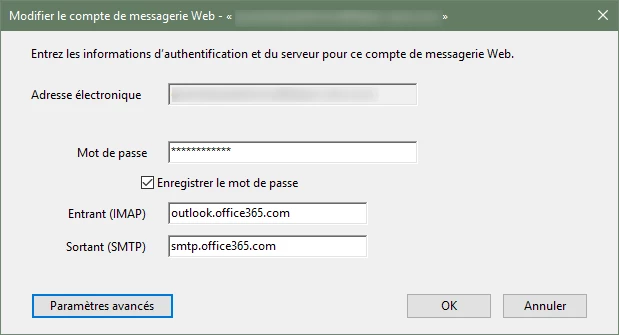
Dans l'application :
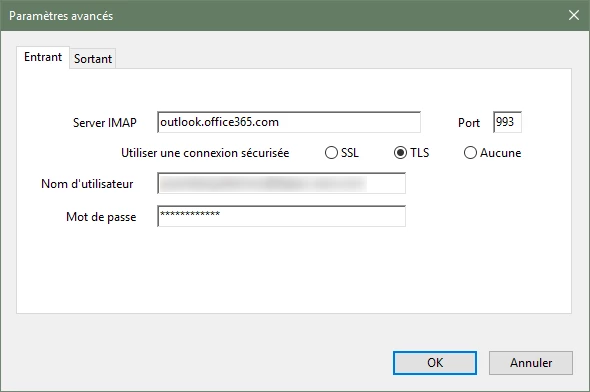
Version du logiciel :

Avez-vous une idée ?

Dois-je contacter le support Microsoft ?

Cordialement,

This topic has been closed for replies.

2 replies

Participant
February 3, 2020

j'ai la même situation que j'utilise win 7 ou 10 avec office 365 entreprise 32 et 64 bits

choisir ssl ne change rien à la situation, y aura t'il une réponse après si longtemps

Participant
February 3, 2020

RÉSOLU, il faut obligatoirement chosir connexion SSL  pour le imap, le smtp est en tls, et le plus important, la suite office des clients étant en français il manque un dossier. Acrobat cherche le dossier DRAFTS ne le trouve pas car il s'appelle en français BROUILLON et donne une erreur. Ajouter le nouveau dossier DRAFTS manuellement et l'envoie par acrobat avec Office 365 fonctionne parfaitement.

Adobe Employee
August 14, 2017

Hi gwendalg14530497,

Thanks for reporting the issue.

All the parameters look OK except one. Kindly use SSL for IMAP server  instead of TLS. It should solve the issue.

Please let us know if you face any more issues.

Regards,

Arvind

Participant
August 14, 2017

Hello,

Thank you for your reply.

Unfortunately even with the IMAP server in SSL, it is impossible to send the message.

The error message is always the same.

Message (translated into English):

"Error while creating message"

I do not think this is a connection problem, because if I change the port or I do not use an encryption protocol, the message will be different and tell me that it can not establish the connection. That is my assumption.

Thank you for your time.

Participant
January 10, 2020

Do you have an answer for this issue, I have the same with win10 and acrobat reader dc