
Sidco
Participant
October 13, 2017
Question

Error 1014:1014

  • October 13, 2017
  • 2 replies
  • 25811 views

Hi Everyone,

I have a case where a customer is on a Windows Server 2012 R2 terminal server. With Adobe Acrobat and Reader is installed. And when the customer tries to open a PDF file from there bank and want it to open in Internet Explorer (version: 11.0.9600.18817) I get this message:
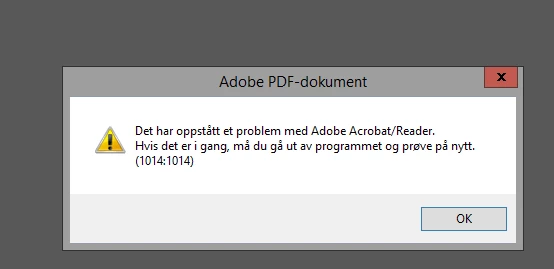
Translated: There has been a problem with Adobe Acrobat / Reader. If it's running, get out of the program and try again. (1014: 1014)

It works if you log into the bank via Google Chrome...

I have tried to repair the install and see after new updates on Reader but same issue. I have not tried to reinstall the program since it's a terminal server I have to do it at night when no one is using Reader.

Thanks in advance for any help

Kind regard

Anders Guldbrandsen

This topic has been closed for replies.

2 replies

Participant
July 12, 2018

I monitored the file accesses of iexplore.exe with procmon. I figured out that a folder permission is missing.

Adjust the security settings of the folder

C:\Program Files (x86)\Adobe\Acrobat Reader DC\

Add User

"APPLICATION PACKAGE AUTHORITY\ALL APPLICATION PACKAGES"

and grant read+execute.

AnandSri
Community Manager
Community Manager
October 13, 2017

Hi Sidco,

As per the description above, you are getting an error 1014:1014 with Adobe Reader/Acrobat, Is that correct?

Please refer to the following KB links which discuss the similar issue:

adobe reader error code 1014:1014 (Acrobat Reader)  Link: https://answers.acrobatusers.com/adobe-reader-error-code-1014-1014-q73339.aspx

Error 1014 when trying to open/print with Acrobat Reader Link: https://forums.adobe.com/thread/2316520

Error 1014:1014  Link: https://forums.adobe.com/thread/2211139

(1014:1014) Error in Browser  Link: https://forums.adobe.com/thread/2112727

Hope this helps, and keep us posted with the results.

Regards,

Anand Sri.

AnnaFuerst
Participant
November 16, 2017

I have the same issue like Sidco, in the same infrastructure.

If I restart the Server and deactivate and reactive the plugin and set Acrobat Standard as the default and afterwards Reader as default it start working again. I cannot say what exactly make it work again.

But after 1-2 weeks, the problem comes back.

For me it looks like a stupid bug.

AnandSri
Community Manager
Community Manager
November 28, 2017

Hello stefanfuerst

Sorry for the delay in response to your query and apologize for the inconvenience caused. I have sent you a private message, please check your email inbox.

Regards,

Anand Sri