Participant
December 16, 2022
Question

ERROR ABRIR PDF

  • December 16, 2022
  • 1 reply
  • 829 views

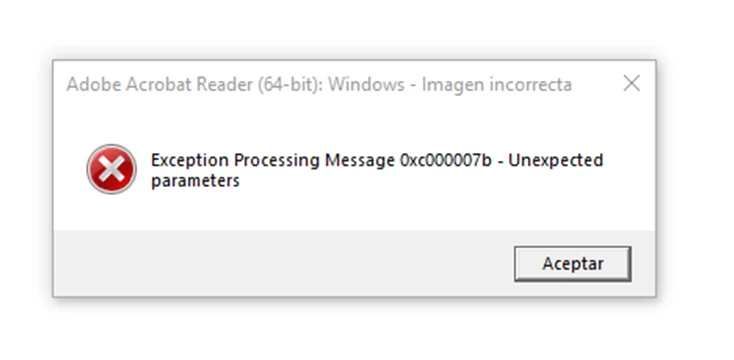
Me salen estos dos errores cada vez que intento abrir un documento en pdf:
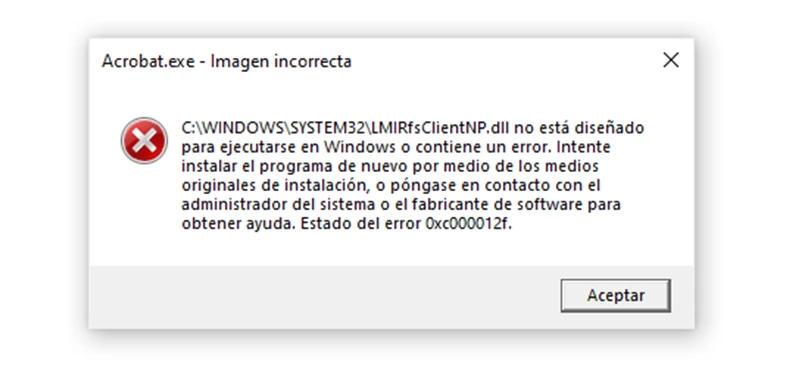
Finalmente me deja ver el documento, pero tengo que aceptar antes estos dos errores...

Y esto lo tengo que hacer cada vez que intento abrir un documento.

Tengo el Adobe Acrobat Reader versión 2022.003.20282 de 64 bits.

No sé cómo arreglarlo, por favor si alguien me puede ayudar, muchas gracias.

This topic has been closed for replies.

1 reply

Krutikka D
Community Manager
Community Manager
December 16, 2022

Hello @Aveira27601247dxnq 


I hope you're doing great, and sorry for the trouble.


As discussed above, you're getting the error message - "Insufficient data to read image."


Kindly try one of these workflows and see if this works :

  1. Change the zoom settings so you can see the contents of the document. Try reducing the Zoom factor, or click Fit One Full Page. (You can make this setting persistent to avoid changing it for every document: Go to Edit Preferences > Page Display, and then choose Fit Page in the Zoom drop-down list at the top.)
  2. Resave the PDF in Acrobat as an Optimized PDF. Choose File > Reduce File Size or Compress PDF. Choose the location to save the file and click Save.

    Also, for more information, please refer to this help article:

https://helpx.adobe.com/in/acrobat/kb/insufficient-data-image.html


Let me know how it goes.


Regards, 

Krutikka