
Participant
March 14, 2017
Question

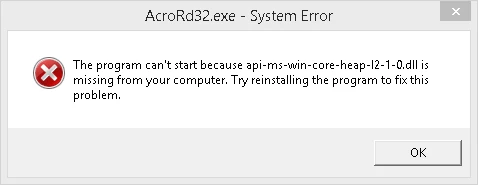
error api-ms-win-core-heap-l2-1-0.dll is missing from your computer when saving pdf in Acrobat Reader RC

  • March 14, 2017
  • 2 replies
  • 28324 views

I have windows 8.1 Pro 64 bit. Whenever i try to save a pdf file using Acrobat Reader DC it comes up with the error api-ms-win-core-heap-l2-1-0.dll is missing from your computer.  I've tried restarting, completing all windows updates ,sfc /scannow, also same error occurs in safe mode. I have removed adobe reader and reinstalled and restarted and still have the same error. Not sure which package the dll comes from or how to remove the message. fyi the files actually saves even though the error pops up about 6 times when saving. Also tried searching for the dll in the registry but there is no reference to it
This topic has been closed for replies.

2 replies

Participating Frequently
June 6, 2018

Sorry to bring this thread back from the dead but the api-ms-win-core-heap-l2-1-0.dll file is a non-existent API file that "routes" or "redirects" to the kernelbase.dll file in Windows 10.

possible solutions:

(a) Upgrade to Windows 10

OR

(b) Avoid using the Save feature of Adobe Reader DC if running Win7 or Win8.1

(c) Use an older version of Adobe Reader like Adobe Reader XI

read this page titled "On API-MS-WIN-XXXXX.DLL, and Other Dependency Walker Glitches"

https://ofekshilon.com/2016/03/27/on-api-ms-win-xxxxx-dll-and-other-dependency-walker-glitches/

kglad
Community Expert
Community Expert
March 14, 2017

try installing the latest ms visual c++

[moved from Installing, Updating, & Subscribing to Acrobat to Acrobat Reader]

Participant
March 14, 2017

I tried your suggestion and downloaded vc++ 2015 update 3 (64bit only) from here Download Microsoft Visual C++ 2015 Redistributable Update 3 from Official Microsoft Download Center 

It asked for a restart which i did but didnt resolve the issue, thanks for the suggestion though